A Definitive Guide to Creating a Point-Based Loyalty Program

8 Minutes to read
Last Updated On

Acquiring new customers is costly in comparison to retaining existing ones. As a result, repeat purchases become a necessity for sustainable business growth. Using a point-based loyalty program helps turn daily user engagements, from logins to product reviews, into opportunities to earn points, which can be redeemed for rewards. This makes them come back to repeat actions and purchases in your store instead of switching to competitors.
You have to use a suitable plugin for this because WooCommerce doesn’t provide a native point-based system. In this article, we compare top WooCommerce loyalty plugins and guide you through installation and configuration of a customer rewards program from scratch.
A points-based loyalty program is a rewards system that lets customers earn points for eligible purchases and actions. It offers points and rewards to customers for every purchase and specific activities completed on their store. Customers can earn points and then redeem them for a coupon, discount, or unlock special benefits.
Customers feel appreciated and get satisfied with their purchases or actions when they receive rewards. This program is far more effective than offering products at prices cheaper than competitors. It also helps build a loyal customer base. People with loyalty points feel compelled to return or buy more products from your store than usual.
Creating and implementing an effective points and rewards-based program on your WooCommerce store brings several potential business benefits. Let’s discuss a few important ones.
In a Points and rewards program, customers are encouraged to complete specific activities like making a purchase, filling out a survey, making a referral, or posting a review. This enhances customer engagement, relationships, and brand value.
Customers are more likely to return to your store when they accrue points, which they know they will get a reward for. Having a point balance on your site gives them a reason to continue doing business with you instead of starting anew with another brand. Every order and activity that helps them earn points toward their next reward solidifies their retention.
By using a point-based loyalty program in WooCommerce, businesses can track customer preferences and purchasing behaviours, which helps them personalise marketing and deliver customised rewards and incentives to individuals. You can also merge loyalty rewards with WooCommerce PDF Vouchers, allowing high-tier members to redeem points for downloadable gift certificates that they can use in-store or share with friends.
Customers are often encouraged to earn points and use them for rewards, leading to increased expenditure to gain more points. This approach is beneficial for businesses providing higher-value rewards for more points since customers are further compelled to spend more to obtain those rewards.
You can use any reliable and robust WooCommerce loyalty plugin to create a point-based rewards program that allows your customers to earn and redeem points for rewards. Before getting into the process, let’s take a glance at the most widely used loyalty points program plugins.
| Plugin Name | Key Features | Pricing | Ratings |
|---|---|---|---|
| Bravo – WooCommerce Points and Rewards |
Product-level bonus point multipliers and On-page reward progress prompts.
|
(19 reviews) | |
| YITH WooCommerce Points and Rewards |
Automatic category/tag product pairing and One-click multi-item cart addition.
|
(120 reviews) | |
| Points and Rewards for WooCommerce by WPLoyalty |
Offers essential loyalty features, including basic reward options.
|
(317 reviews) | |
| Easy Loyalty Points and Rewards for WooCommerce |
Easy setup with essential features and basic reward options.
|
(11 reviews) | |
| myCred – Points, Rewards, Gamification |
Gamified rewards with a flexible points-based earning system.
|
(472 reviews) |
Now that you have a general understanding of the prices and use cases of popular loyalty points plugins, we will move on to installing and using this plugin to create a rewards system for your eCommerce store. In the step-by-step process below, we are using Bravo.
Follow the step-by-step process given below to install and activate Bravo, a WooCommerce Points and Rewards plugin in WordPress, to configure earning rates, redemption limits, and customer actions for your online store.
There are two methods to install the plugin:
Step 1: Retrieve the plugin ZIP file.
Step 2: Upload the plugin ZIP file under “Plugins > Add New.” Select the “Upload Plugin” tab at the top and pick the ZIP file to upload.
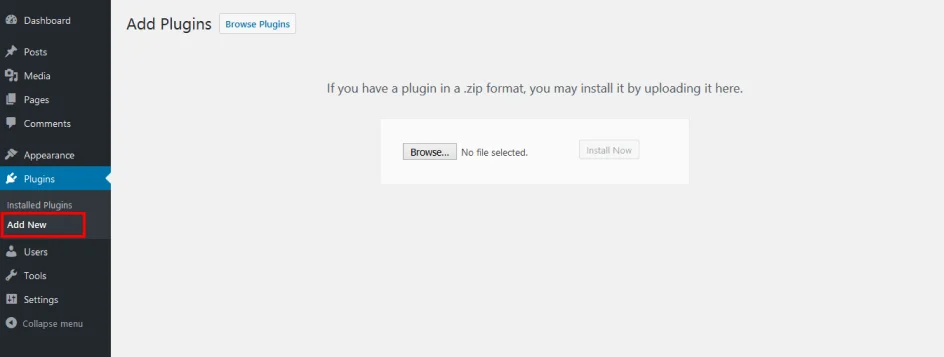
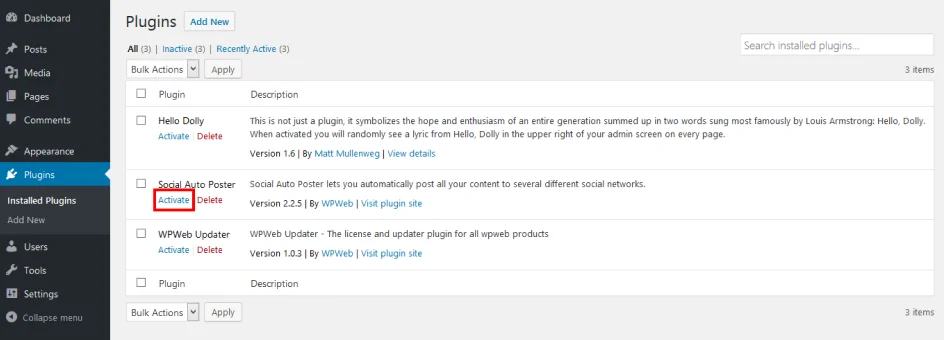
Step 3: Activate the plugin once it is uploaded.
Step 1: Go to the “wp-content > plugins” location.
Step 2: Get the plugin ZIP file and extract it to access the plugin folder.
Step 3: Drag and drop the new “bravo-woocommerce-points-and-rewards” plugin folder into the “wp-content > plugins” directory.
You need a valid license key to unlock the plugin’s features on your store:
Get access to the plugin settings by navigating to WooCommerce → Settings → Points and Rewards → General Rewards.
[woopr_points_history] – Show Customers Their Credit Balance.
Navigate to WooCommerce → Settings → Points and Rewards → Action to Earn Points to access these settings.
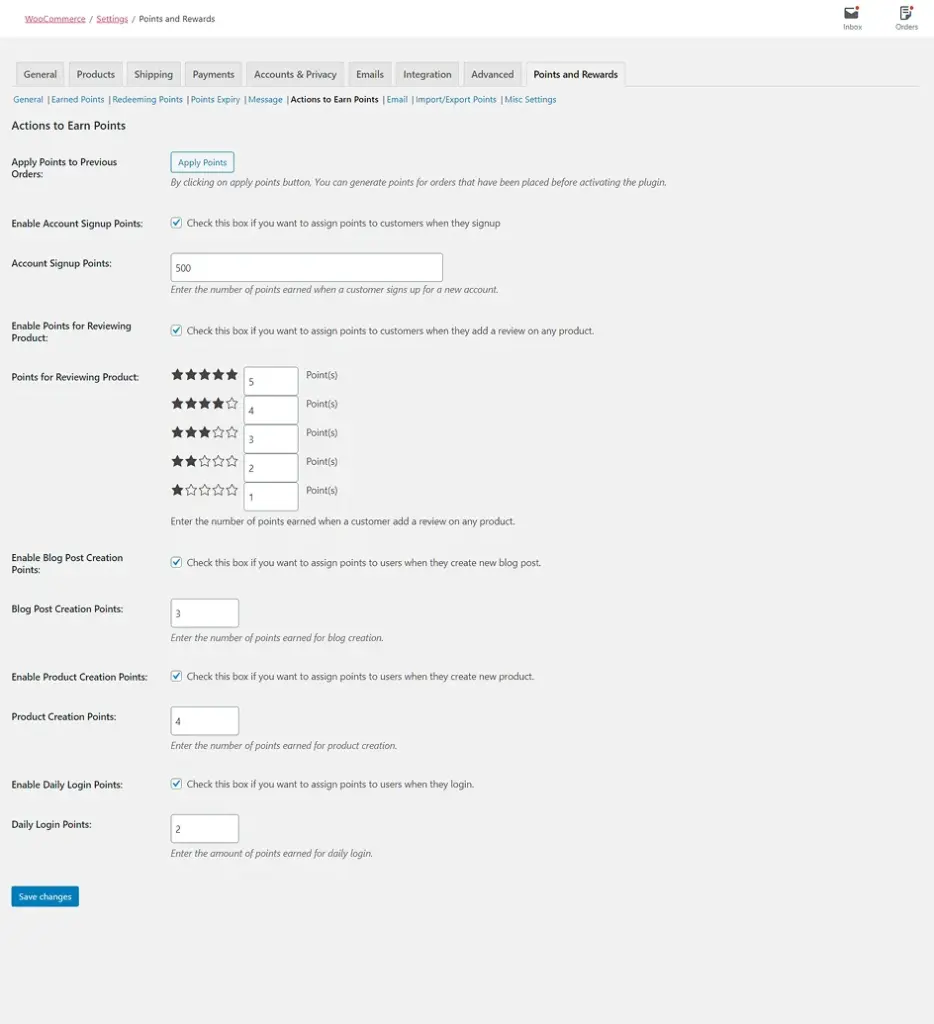
You can give points for previous orders that can’t be reversed now and have not been assigned any points. This is a practice many businesses do after installing the plugin first to encourage users to come back to buy more. But before you give away points for past orders, make sure you have thought and planned it out properly.
Give customers points for signing up by creating an account with your store. It’s up to you to decide the amount of points they earn for it. You can also pair account signup rewards with WooCommerce Social Login to eliminate registration friction. This helps shoppers to create an account in one click and start earning points immediately.
Select this checkbox if you want customers to earn points by adding a review on any product, and enter the number of points you want a customer to earn for adding a review.
Check this box to assign points to users for creating a new blog post and enter the value.
Mark this box and assign the number of points to give users for adding a new product.
Check the box and assign the points you want every user to earn for daily login.
Once you have configured and launched the loyalty milestones and bonus-point promotions, a Social Auto Poster plugin will automatically announce your reward campaigns across all your social media profiles, encouraging followers to visit the store.
Using a point-based loyalty program is a great approach for retaining customers as well as driving more sales on your WooCommerce store. When customers earn points for specific actions and making more purchases, they feel motivated to carry out more tasks and shop at your store. But for this program to yield effective outcomes, you need to plan out a comprehensive strategy regarding when and how to reward your customers.
No, the WooCommerce platform has coupons but doesn’t offer anything to track points or grant rewards to repeat customers. You have to use a plugin to create and execute a reward points system.
Choose a reward value your margins can support. For example, awarding one point per $1 spent and letting customers redeem 100 points for $1 gives a base reward rate of 1%, before bonuses or other adjustments.
Guest eligibility depends on the plugin. Some systems require an account, while others can associate eligible guest purchases with a customer account under specific conditions.
Registered customers can earn loyalty points on your store through purchases, everyday actions like logging in, social sharing, posting reviews, and more. Most of the points can only be earned through successful orders or by directly buying the points bundle.
Points depend on your earning rules, such as points per dollar spent or fixed bonuses for eligible actions. Some programs also use tiers to give qualifying customers higher earning rates.
You can give your WooCommerce store customers an option to redeem their loyalty points for specific offers or discount coupons.