





SMS Notifications - Follow My Blog Post add-on
Using the Follow My Blog Post - SMS Notifications Extension allows you to automatically send SMS alerts to subscribers whenever new content is published, a post is updated, or new comments are added. This feature enhances reader engagement and audience retention with features like Twilio integration, customizable SMS templates for tags, categories, and authors, and a streamlined WordPress dashboard interface.


With SMS Notifications Extension You Can:

Send SMS Notifications to Your WordPress Followers
Keep subscribers updated through text messages instead of relying only on email. Send SMS notifications to followers of posts, pages, categories, tags, and authors when relevant content is published or updated.

Allow Visitors to Follow Using Phone Numbers
Let visitors add their phone numbers when following content on your website. Both registered users and guests can provide a number during subscription, allowing them to receive SMS updates for the content they follow.

Send SMS Alerts When Posts Are Updated
Notify subscribers when changes are made to posts or pages they follow. Customize the message to include the updated post title, link, and website name, making it easy for readers to return to the content.

Notify Followers About New Posts in Categories & Tags
Send SMS alerts when new articles are published under subscribed categories or tags. Visitors can follow their preferred topics and receive text message updates when new content becomes available.

Send SMS Notifications for New Author Posts
Let readers stay updated with their favorite authors. When an author publishes a new post, the extension can notify subscribers following that author with a customized SMS containing the post details and link.

Alert Subscribers About New Comments
Keep discussions active by notifying followers when new comments are approved on subscribed posts. Include the post title, commenter information, or comment text in the notification message.

Integrate SMS Delivery With Twilio
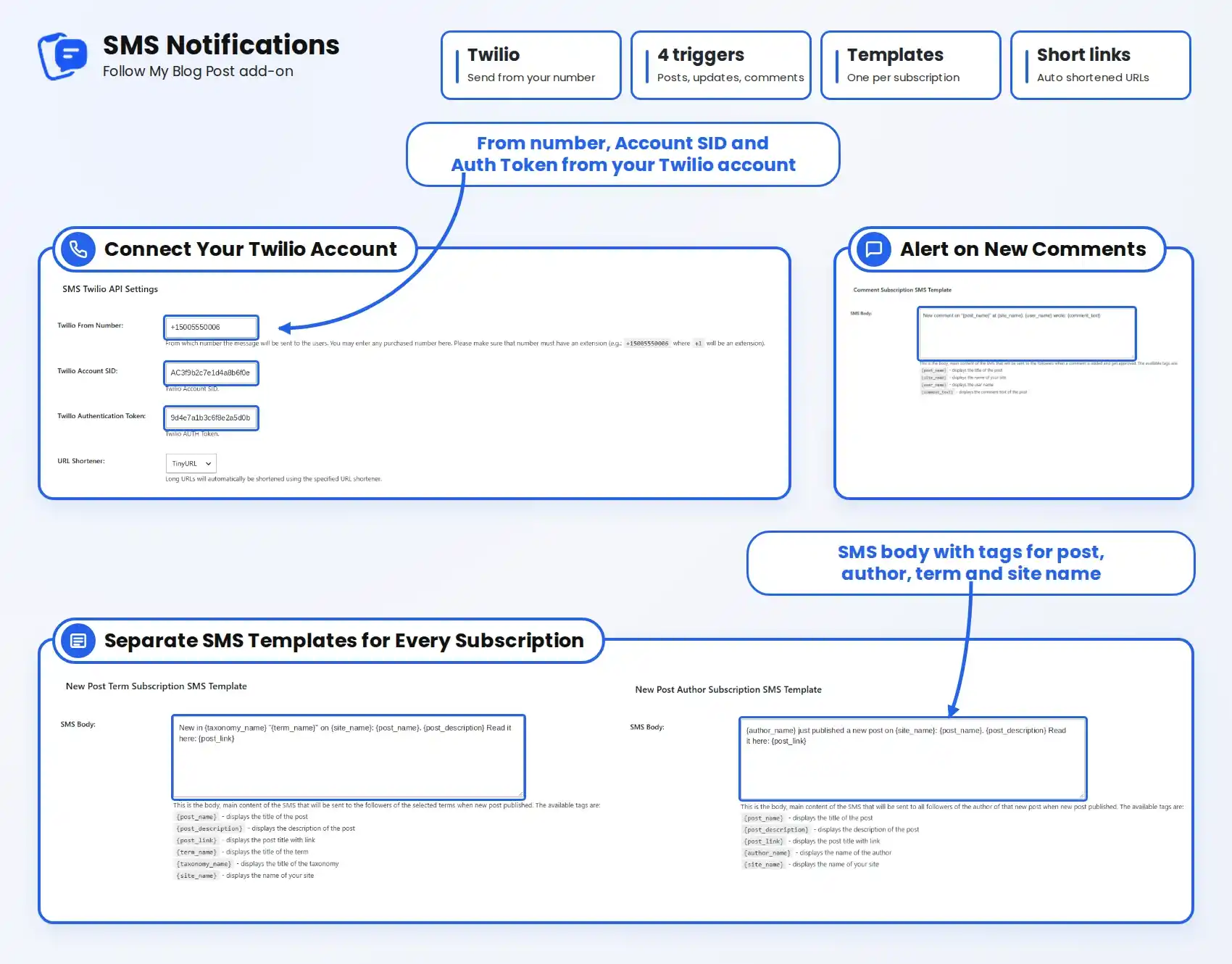
Connect your Twilio account to send SMS notifications from WordPress. Configure your Twilio phone number, Account SID, and authentication token directly from the extension’s settings panel.

Customize SMS Templates for Different Events
Write separate SMS messages for updated posts, new category or tag posts, author publications, and comments. Customize each message to provide subscribers with the information that matters for that notification.

Personalize SMS Messages With Dynamic Tags
Use supported template tags to automatically include post titles, links, descriptions, author names, category details, and website information. Create reusable SMS templates without manually updating every message.

Manage Subscriber Phone Numbers From WordPress
View subscriber phone numbers alongside email addresses in your existing follower lists. Check contact details for followers of posts, taxonomy terms, and authors without managing a separate subscriber database.

Allow Users to Update Their Phone Numbers
Give registered users the option to manage their SMS contact details from their WordPress profile. Saved phone numbers can be reused when users follow additional content, reducing repeated data entry.

Support SMS Subscriptions for Guest Visitors
Allow visitors to receive SMS notifications without creating an account. The extension displays a phone number field when a guest follows supported content, making it easier for casual readers to subscribe.

Shorten Links in SMS Notifications
Use the available URL shortener setting to reduce the length of links included in SMS messages. Share content links more neatly and leave more room for your notification text.

Manage SMS Settings From One Dashboard
Configure Twilio credentials, customize notification templates, and manage SMS settings from the Follow My Blog Post admin panel. Keep your text message notifications connected to your existing content subscription system.
Keep Your Audience Engaged with Automated SMS Alerts for Posts and Comments

Transparent Pricing Models
Pick a suitable plan for your WordPress site to keep followers connected with automated SMS notifications. Every plan provides complete access to the SMS Notifications extension, regular feature updates, and dedicated technical support.
1 Website
Use on 1 website
1 year of plugin updates
1 year of premium support
5 Websites
Use on up to 5 websites
1 year of plugin updates
1 year of premium support
Unlimited Websites
Use on unlimited websites
1 year of plugin updates
1 year of premium support
All Plans Include the Following Features
Add SMS notifications to Follow My Blog Post and keep subscribers informed about new posts, content updates, and comments through customizable text messages.
- Twilio SMS Gateway Integration
- Phone Number-Based Subscriptions
- Guest User SMS Subscriptions
- Registered User SMS Subscriptions
- SMS Alerts for Updated Posts
- SMS Alerts for Updated Pages
- New Post Notifications for Followed Categories
- New Post Notifications for Followed Tags
- New Post Notifications for Followed Authors
- New Comment SMS Notifications
- Custom SMS Notification Messages
- Separate SMS Templates for Post Updates
- Custom Category & Tag Notification Templates
- Update Phone Numbers from User Profiles
- Manage SMS Followers in Admin
- Custom Author Post Notification Templates
- Custom Comment Notification Templates
- URL Shortener Settings
- Subscriber Phone Number Collection
- Twilio Sender Number Configuration

14-Day Money-Back Guarantee. No Questions Asked!
We stand by our product. Purchase any plan with complete confidence knowing you are eligible for a refund within 14 days if the add-on doesn't meet your needs.
Discover what our customers have to say about their experience with our plugins. Read genuine reviews and see how our solutions help businesses simplify their workflow.
Bought this product? Be the first to review it All Ratings & Reviews
More Screenshots
Technical Information


Frequently Asked Questions
All features included on every plan. Pick the license that fits your store.

With the SMS Notifications add-on, your visitors can follow posts, pages, terms, and authors using their phone number and receive SMS updates whenever related content is published or updated. It provides notifications for post updates, new posts on subscribed topics, authors, and approved comments.
Our Add-on uses Twilio to send SMS notifications. From the Follow My Blog Post settings, you can configure your Twilio Account SID, Authentication Token, and Twilio phone number.
Yes. It is possible to design custom SMS templates tailored to each notification type. You can personalise your messages using dynamic tags including {post_name}, {post_link}, {site_name}, {author_name}, {term_name}, and {comment_text} provided by the addon.
No. Users who are logged in can add their phone number to their profile. The addon can automatically use the stored number for subscribed posts, pages, terms, or authors once it has been saved. Users are also able to update their phone number on their profile page.