How to Use Cloudflare with WordPress: A Step-by-Step Setup

12 Minutes to read
Last Updated On

Running Cloudflare with WordPress costs $0 on the Free plan, which includes DNS, a Universal SSL certificate, unmetered DDoS protection, the CDN, and a free subset of the web application firewall (WAF) rules. It doesn’t cache your HTML, though. Images, CSS, and JavaScript come from the edge, but every page view still runs PHP and MySQL on your server until you add Automatic Platform Optimization (APO), a $5 monthly add-on on Free, or write a cache rule yourself.
In practice, two settings cause most of the trouble. Flexible SSL produces a “too many redirects” loop on sites that force HTTPS, and a careless cache rule can serve a page rendered for a logged-in administrator to anonymous visitors. Full (strict) and a cookie-aware cache prevent both.
After you connect Cloudflare with WordPress, proxied DNS records resolve to Cloudflare’s anycast addresses instead of your server. Each request lands at the nearest of more than 330 Cloudflare locations, passes the WAF, and is answered from that location’s cache or forwarded to your origin. That makes two connections, and the SSL/TLS mode decides how the second one is protected.
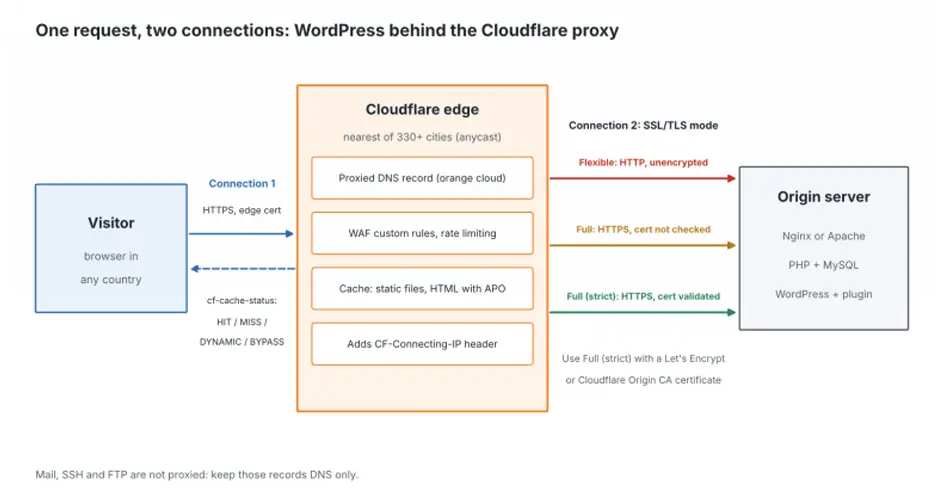
Two side effects matter on day one. WordPress sees Cloudflare’s IP addresses instead of visitors’ until something restores them from the CF-Connecting-IP header. And the proxy carries only web traffic, so mail, SSH, and FTP hostnames stay DNS-only and still expose the server’s address.
Collect these before connecting Cloudflare with WordPress; a missing one turns a quick nameserver change into an outage.
Setting up Cloudflare with WordPress goes SSL and DNS first, caching last, so each change can be tested on its own.
1. Create a Cloudflare account, add the domain, and pick the Free plan. Upgrading later doesn’t touch DNS.
2. Compare the imported DNS records with your export; the scan often misses DKIM selectors and rarely used subdomains. Keep the root A record and www proxied (orange cloud), and set mail, FTP, and control panel hostnames to DNS only.

3. Replace the nameservers at the registrar with the two Cloudflare assigns to your zone. Activation often takes minutes, but allow up to 24 hours.
4. In SSL/TLS, choose Full (strict), or keep Automatic SSL/TLS if your dashboard offers it, and enable Always Use HTTPS. Both addresses under Settings > General in WordPress should start with https://.
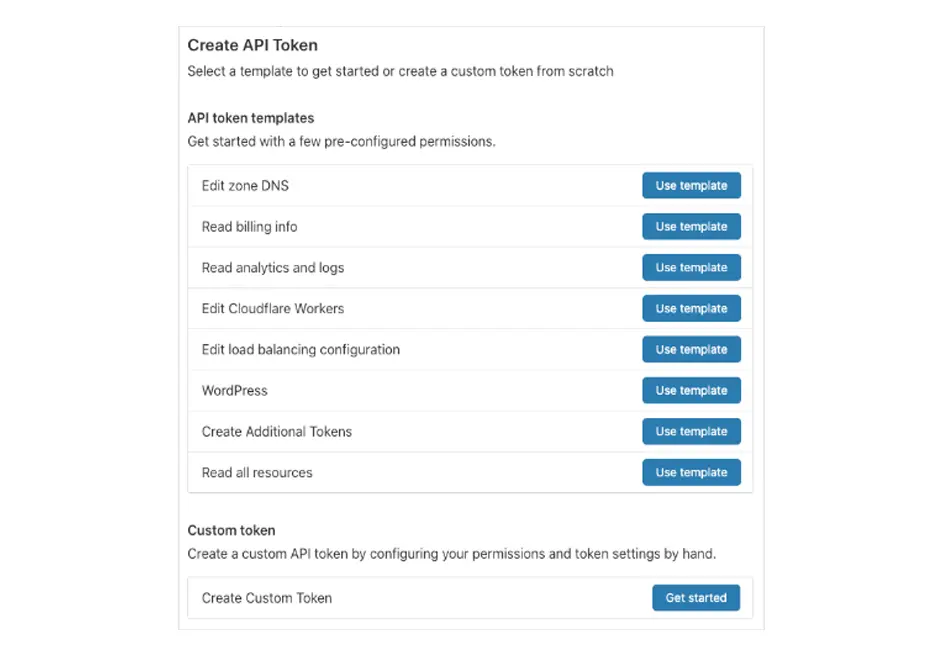
5. Install the Cloudflare plugin (version 4.14.5 from October 5, 2026; it needs WordPress 6.7 and PHP 7.4 or newer). Connect it with an API token made from the WordPress template, not the Global API Key, which opens your whole account. Turn on Auto Purge Content On Update.
6. Pick one HTML cache, APO, or a cache rule, never both.
7. Add the firewall rules below, then test logged-out pages, the admin area, a form, and, on WooCommerce, a full checkout.
The mode only affects the Cloudflare-to-server connection; visitors get HTTPS from Cloudflare’s edge certificate either way. For Cloudflare with WordPress, there’s rarely a reason to go below Full (strict). Hosts issue Let’s Encrypt certificates for free, and a Cloudflare Origin CA certificate, valid for up to 15 years and trusted only by Cloudflare, covers servers where certbot isn’t an option.
| Mode | Cloudflare to origin | Origin certificate | Effect on a WordPress site |
|---|---|---|---|
| Flexible | HTTP, unencrypted | None | Redirect loop when WordPress forces HTTPS; logins travel unencrypted to the server |
| Full | HTTPS, certificate not validated | Any, even self-signed or expired | Works, but a device on the path can present a fake certificate |
| Full (strict) | HTTPS, certificate validated | Let’s Encrypt, another public CA, or Cloudflare Origin CA | Recommended; an expired certificate returns error 526 |
Automatic SSL/TLS probes the origin about once a month and upgrades the mode in steps, but never downgrades it. A failed Let’s Encrypt renewal on Full (strict) therefore means error 526 for visitors, so monitor certificate expiry.
Under Flexible, Cloudflare fetches pages over plain HTTP, WordPress answers with a 301 to HTTPS, and the browser ends at ERR_TOO_MANY_REDIRECTS. The plugin’s header rewrite hides the loop; switching to Full (strict) fixes it.
Mixed-content warnings come from hard-coded http:// links in posts and theme options. Automatic HTTPS Rewrites catches most at the edge, and WP-CLI fixes the rest (remove the dry-run flag once the count looks right):
wp search-replace 'http://example.com' 'https://example.com' --skip-columns=guid --dry-runWithout an HTML cache, Cloudflare with WordPress returns cf-cache-status: DYNAMIC for posts, and time to first byte (TTFB) still depends on PHP and the distance to your server. Use one of the two methods below per hostname; their purge logic doesn’t know about each other.
With the plugin installed, APO caches HTML for 30 days and invalidates a changed page within 30 seconds. It skips the cache for logged-in, session, and WooCommerce cookies, never caches checkout, wp-cron.php, or feeds, and caches URLs with query strings only when they carry supported marketing parameters. On Free, it costs $5 a month and covers unlimited subdomains; Pro and Business include it.
Testing trips people up. Chrome with DevTools’ Disable cache ticked shows BYPASS, and curl without an Accept header can show DYNAMIC. Test like a browser:
curl -sI -H "accept: text/html" https://example.com/sample-post/ | grep -iE "cf-cache-status|cf-apo-via"Run it twice. The second response should show cf-cache-status: HIT.
Without APO, a cache rule can mark HTML as eligible for cache. Free allows 10 cache rules (Pro 25, Business 50), and WordPress needs one:
(http.host eq "example.com" and not starts_with(http.request.uri.path, "/wp-") and not (http.cookie contains "wordpress_logged_in" or http.cookie contains "wp-postpass" or http.cookie contains "comment_author" or http.cookie contains "woocommerce_items_in_cart"))The /wp- prefix excludes wp-admin, wp-login.php, wp-cron.php, and /wp-json/, while /wp-content/ files keep Cloudflare’s default caching. Set Edge TTL to ignore the origin’s cache-control header with a 2-hour value, and let the plugin’s auto-purge clear edited posts. Stores must also exclude /cart/, /checkout/, and /my-account/, which is why APO suits WooCommerce better.
Super Page Cache by Optimole (70,000+ active installations) builds and purges this rule through the API if you’d rather not maintain it by hand.
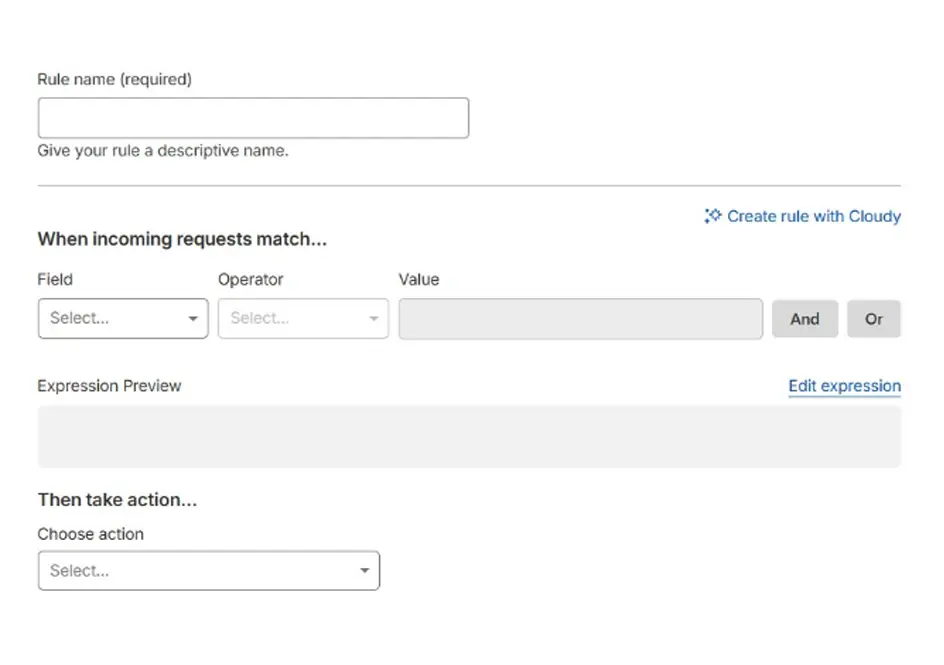
Password guessing on wp-login.php and xmlrpc.php abuse shows up in the logs of nearly every public WordPress site. Free allows five WAF custom rules (Pro 20, Business 100). The first puts a Managed Challenge on the login page and admin area:
(http.request.uri.path eq "/wp-login.php") or (starts_with(http.request.uri.path, "/wp-admin/") and http.request.uri.path ne "/wp-admin/admin-ajax.php")Excluding admin-ajax.php keeps front-end features working. Administrators solve the challenge once and keep a clearance cookie for 30 minutes by default. The second rule blocks /xmlrpc.php; skip it if you use Jetpack, which connects through XML-RPC.
Free also gets one rate-limiting rule with a fixed 10-second window, a 10-second block and path-only matching, so GET and POST count alike. Five requests to /wp-login.php per 10 seconds per IP stops scripted guessing without bothering someone who mistypes a password twice. Pro allows two rules with longer windows and the full Cloudflare Managed Ruleset, which includes WordPress-specific rules.
Forms are the last gap. The Simple CAPTCHA with Cloudflare Turnstile plugin (200,000+ active installations) adds Turnstile, Cloudflare’s free CAPTCHA replacement, to login, registration, comment, and WooCommerce checkout forms.
Older lists of the best Cloudflare settings for WordPress still recommend Rocket Loader and Auto Minify, and neither helps when you run Cloudflare with WordPress today. Rocket Loader changes script execution order; on themes with inline jQuery, page builders, and sliders, a menu or form silently stops working, so leave it off unless you test every template. Auto Minify is gone: Cloudflare deprecated it in 2024.
For real visitor IPs, the plugin swaps in CF-Connecting-IP inside WordPress. Server logs and fail2ban need the same fix at the web server: real_ip_header CF-Connecting-IP plus a set_real_ip_from line for each range listed at cloudflare.com/ips in Nginx, or mod_remoteip in Apache 2.4.
Errors 521 (connection refused) and 522 (timeout) usually mean a server firewall such as CSF is blocking Cloudflare’s addresses, since all traffic now arrives from them. A 525 is a failed TLS handshake; a 526 is an invalid certificate under Full (strict). And proxied DNS hides your origin only from new lookups. Historical DNS services keep the old address, so on attacked sites, allow ports 80 and 443 only from Cloudflare’s ranges.
Both fixes need root access to the web server and the firewall, which shared hosting rarely gives you. On an unmanaged VPS, they take a few lines of config: LikeVPS, for example, describes its WordPress setup as Nginx, PHP-FPM, and Redis that you install and maintain yourself, so the real-IP block and the port allowlist are yours to edit.
Pairing Cloudflare with WordPress isn’t the only option, and for some sites it isn’t the cheapest. These are list prices for one site:
| Provider and plan | Price for one site | WordPress HTML caching | Security included | Where it falls short |
|---|---|---|---|---|
| Cloudflare Free + APO | $5 per month for APO | Yes, APO, purged in about 30 s | Free managed rules, 5 custom rules | Full Managed Ruleset needs Pro |
| Cloudflare Pro | $20 per month billed yearly, $25 monthly | Yes, APO included | Full Managed Ruleset, 20 custom rules | Priced per domain |
| Bunny.net Standard | $0.01 per GB in Europe and North America, $1 monthly minimum | Static files; HTML needs your own edge rules | Bunny Shield, sold separately | Standard network has 119 PoPs; Bunny Optimizer costs $9.50 per month extra |
| QUIC.cloud | Free plan $0; Standard billed per GB | Yes, through the LiteSpeed Cache plugin | Basic on Free; brute-force defense on Standard | Free plan runs on 6 PoPs in North America and Europe |
| Sucuri | Firewall from $9.99 per month; Basic Platform $199.99 per year | Edge caching included | WAF; malware cleanup on Platform plans | No public per-GB rates |
| Amazon CloudFront flat-rate | Free $0 (1M requests, 100 GB); Pro $15 per month | Manual cache behaviors and cookie forwarding | AWS WAF and DDoS protection bundled | Request caps; needs AWS experience |
HTML caching with automatic purge decides it. Cloudflare APO and QUIC.cloud (via LiteSpeed Cache) do it out of the box; Bunny.net and CloudFront leave page caching to rules you maintain. Sucuri’s yearly price includes malware cleanup, which no Cloudflare plan offers. As a Cloudflare WordPress alternative, Bunny.net suits sites that want a paid CDN without a per-site fee: 100 GB of European or North American traffic costs about $1.
Also Read: WordPress Security Checklist
Cloudflare with WordPress can look right from your desk and misbehave elsewhere. Each location keeps its own cache, so a HIT in Frankfurt says nothing about Singapore, and country rules on ip.src.country, rate limits, and challenges depend on where a request comes from. The check is to send the same request through proxies in your audience’s countries.
The /cdn-cgi/trace path on any proxied hostname returns colo, the Cloudflare data center that answered, and loc, the country assigned to the client IP. The cf-ray header ends with the same data center code:
curl -s -x http://USER:PASS@PROXY_IP:PORT https://example.com/cdn-cgi/trace

curl -sI -x http://USER:PASS@PROXY_IP:PORT -H "accept: text/html" https://example.com/ | grep -iE "cf-ray|cf-cache-status"
Expect MISS on the first request from a new location and HIT on the second. A page that stays DYNAMIC from abroad points to a cookie forcing a bypass, for example, one set by a currency or language plugin. A request from a blocked country should get the block page and nothing else.
Static datacenter IPs suit this QA better than rotating pools, because the same address returns the same loc on every run. Proxys.io, in business since 2016, rents individual IPv4 proxies in the US, UK, Germany, the Netherlands, France, Poland, Canada, Brazil, Australia, and other countries at $2.30 per IP per month for one to four addresses and from $1.47 at volume, with HTTP(S), SOCKS5, IP-whitelist authorization, and a 24-hour refund window. Oxylabs lists dedicated datacenter IPs at $2.25 with a minimum of three, IPRoyal at $1.57, and Bright Data from $1.40 when you buy ten. For three or four test countries, buying single addresses matters more than a few cents.
Yes. APO bypasses the cache when WooCommerce cart or session cookies are present and never caches checkout, so catalog pages come from the edge while carts stay dynamic. Per-visitor pricing needs care, because a cached product page shows everyone the same price.
A Cloudflare WordPress setup works without it for DNS, SSL, and the WAF, but APO requires it, and it also handles purges and visitor IPs. Its WordPress.org rating is 3.5 out of 5, with recent complaints about settings not saving, so confirm each change in the Cloudflare dashboard.
No. EmDash, announced on April 1, 2026, is a separate MIT-licensed CMS written in TypeScript on Astro and still in early developer beta. WordPress PHP themes and plugins don’t run on it.