
How to Plan a Website Structure: A Step-by-Step Guide
-
 Last Updated On
A well-planned website structure organizes your pages, content, navigation, and internal links so users can find information easily and search engines can discover important pages. Whether you are building a new website or restructuring an existing one, the process starts with defining your goals, understanding your audience, grouping related content, and creating a logical page hierarchy.
In this guide, you’ll learn how to plan a website structure step by step, create a visual sitemap, organize website content, plan URLs and navigation, build internal links, and avoid common structural mistakes.
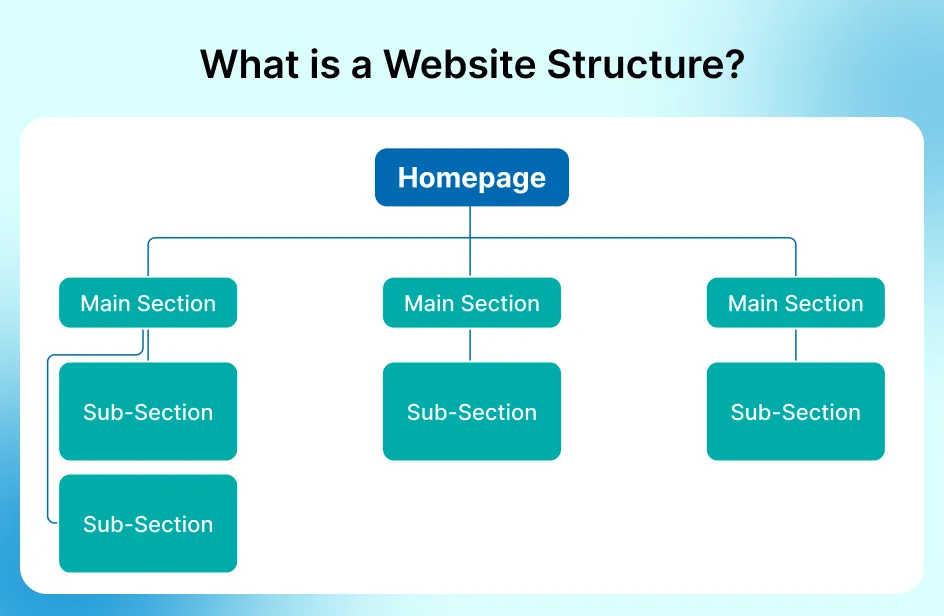
A website structure is the organized framework of your website’s pages, categories, and internal links. It defines how content is grouped, connected, and accessed by both users and search engines.
Understanding your website’s structure often goes hand-in-hand with knowing the platform it’s built on, which is where a CMS checker can be useful to identify the content management system behind it.
The ideal website structure depends on the type and purpose of your website. There are five main types of structure:
A well-planned website structure directly impacts user experience, SEO performance, and overall business outcomes. It helps users navigate easily while enabling search engines to crawl and index content efficiently. A clear structure also increases the chances of earning sitelinks and improves visibility in search results.
A good website architecture plan leads to a website that’s well-structured. Additionally, a website that’s structured well increases the chances of acquiring sitelinks as well as other SERP features.
Planning your website structure before creating pages helps you organize content logically and avoid unnecessary changes later. The process below takes you from defining your website goals and researching search intent to creating your page hierarchy, sitemap, URLs, navigation, and internal linking structure.
The following are ideal steps to guide you through website architecture planning:
Start by identifying what the website needs to achieve. Define its primary business objective, target conversions, main products or services, target audience, and the types of information visitors need. These goals help determine which pages should sit at the top of your hierarchy and which should support them.
For an existing website, also review which pages currently attract traffic, generate conversions, or support important user journeys.
Identify the audiences your website needs to serve and determine what each group is looking for. Consider their questions, problems, goals, search behavior, and the information they need before taking action.
If your website serves multiple audiences, map their main journeys separately. This can help you decide which sections belong in the primary navigation and which content should sit deeper within the site.
Research the topics your audience searches for and group related keywords according to search intent. Instead of creating a separate page for every keyword variation, identify which queries can be addressed by the same page.
Map the research into a structure such as:
Keyword → Search intent → Topic → Page → Category
For example:
WordPress Development
Competitor research can be used at this stage to identify topics, categories, and pages that may be missing from your planned structure.
This directly strengthens your website content structure query cluster.
Choose the kind of website structure that is most suitable for your brand. It’s a strategic arrangement of information where the most important content is more emphasized than the less important.
During this stage, it is crucial to determine your site’s underlying architecture. Deciding whether you are building a fixed, standalone layout or a data-driven setup, as detailed in our guide on Static vs Dynamic Websites, will directly dictate how you map out your top-level tiers and subcategories.
A visual sitemap is a hierarchical diagram that reflects your website’s actual structure. The generated sitemap lets you see your project from a bird’s-eye view, assess its scale, and identify bugs.
Your URLs should reflect the organization of your website and make the destination clear to users. Use short, descriptive URLs that follow a consistent pattern across the site.
Best practices include:
Navigation and internal links connect the pages within your website and help users move between related sections. Plan your main navigation around the most important sections of the site, then use contextual internal links to connect related pages.
For example, a service page can link to related case studies, guides, FAQs, and supporting service pages. A blog article can link back to a relevant service or category page when the connection is useful.
Also check for orphan pages and add relevant connections where appropriate.
An XML sitemap is a machine-readable file that lists URLs you want search engines to discover. After your website structure is finalized, generate an XML sitemap and check that it contains the appropriate canonical URLs.
Keep the sitemap updated as important URLs are added or removed, and monitor indexing issues through Google Search Console.
Sitelinks are additional links from the same domain grouped under a text result. To save the time of users and let them find the information they’re looking for quickly, make sure to check your website’s link structure to find shortcuts.
Before launching or finalizing the structure, test how easily users and search engines can move through the site. Check the main navigation, mobile menus, breadcrumbs, internal links, important page paths, and search functionality.
Also review click depth, broken links, orphan pages, redirects, and pages that may be difficult to reach. Use real users or team members to test common journeys and identify areas that need improvement.
A well-structured webpage architecture relies on several elements that contribute to its navigation, organization, and user experience overall. The key to crafting a user-friendly and reliable online presence is to understand and implement these elements.
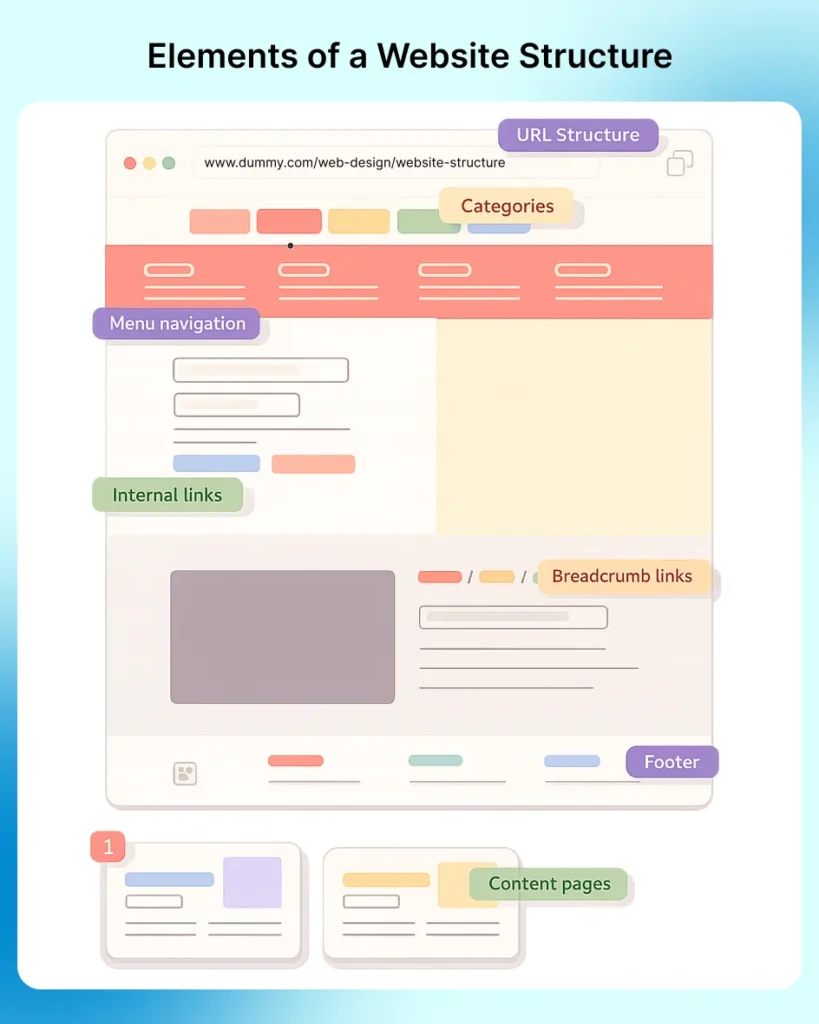
Your homepage is the first entry point for visitors and serves as your website’s focal point. It should guide visitors through the site and link to your most vital pages.
It sets the stage for everything. Furthermore, your homepage should provide clear paths to your most important sections and pages.
Tip: Before starting any design process, it’s necessary to have a complete grasp of your content, the users, and their needs.
Menu or navigation bars guide users through the website, normally by providing links to different categories or pages. These bars additionally enable users to navigate between sections and seamlessly find the information they need.
Tip: A clearly and consistently designed menu/navigation makes it easy for users to understand across various devices. Arrange related pages and use logical, concise, and descriptive labels for menu items.
Build a logical organization by grouping similar content or products under categories if you have plenty of content. Grouping creates a logical hierarchy that users and search engines find it easy to scan and navigate. Every category should be a reflection of a specific topic or theme and make browsing intuitive.
Tip: Create categories that flow directly from the data. When you see something interesting with regard to your data, build a category to represent it.
These are pages that carry your brand’s message: product information, blog posts, case studies, FAQs, and more. They all should be in the right place to inform users where they are and what comes next. Foundational pages, such as “Contact” and “About,” help build trust and make your website feel complete.
Tip: Make your content pages as clear, creative, consistent, credible, and customer-centric as possible. Use credible research and back up your claims with tangible data.
Internal hyperlinks connect pages within the site, indicating relationships and improving navigation. These links also help search engines discover and index content.
Tip: It’s a good idea to build an internal linking strategy; it connects the right content and helps users discover relevant information. Begin by identifying key pages and naturally linking them throughout supporting content.
Footers are located at the bottom of website pages, typically containing copyright information, secondary navigation, social media links, contact details, and, in some instances, a site map. Although often neglected, a well-structured footer can improve usability and offer quick access to important information to users.
Tip: Use the best practices to build a footer that’s functional and unforgettable. If you want a well-structured website, don’t treat footers as an afterthought but a strategic asset.
Breadcrumbs are navigational aids, located near the top of the webpage. Furthermore, they provide a quick way for users to see where they are and how they got there. They usually are showcased as a horizontal trail near the page top, such as: Home→ Category→ Subcategory→ Page. A small detail, but breadcrumbs help users explore related sections or backtrack without getting lost.
Tip: The rule of thumb for breadcrumb creation is to use them as an addition to major navigation. They’re not used as a replacement for global navigation, but they support and amplify primary navigation.
Not only does a URL structure play a vital role in the overall organization of a website, but it also has SEO implications. Considerations, such as HTTPS, trailing slashes, and www redirects, are critical for URL structure optimization.
Tip: Optimize your website URL by using relevant keywords and maintain a consistent hierarchy reflecting your brand. Hyphens are effective in separating words and shortening your URLs.
The following are some quick, easy points to keep in mind:

Explore our guide to the Top Web Development Companies.
Avoiding these common pitfalls helps create a better user experience, improves search engine rankings, and ensures your website functions smoothly across all devices.
Broken links can make it harder for users to reach content and can disrupt navigation paths across a website. Regularly review important internal links and fix links that point to removed or incorrect URLs.
The solution: Consider doing broken link audits using tools such as Google Search Console. There are also third-party link checkers. Fix or remove any issues immediately.
Your business website should work on mobile devices. These days, the majority of people are using their mobile devices to access the internet, so it’s more likely that a big portion of your website visitors are on a smartphone. You wouldn’t want them to lose interest in your brand if they’re forced to look at your website that doesn’t look good on small screens.
The solution: Use a responsive design framework that adjusts to different screen sizes. Furthermore, test your website across devices to make sure that menus, layouts, and content remain user-friendly and accessible.
SEO efforts can be diminished through cannibalization and confuse the search engines if there are many pages with duplicate content. Typically, visitors don’t have to see the same information in various places.
The solution: Doing regular audits of content to determine and combine repetitive content ensures that each page provides unique value. If some duplication can’t be avoided, utilize canonical tags to inform search engines which page version is the primary one.
These are webpages not linked to from any other pages. Orphan pages make it difficult for users and search engine crawlers to find. Furthermore, they’re likely not indexed by search engines since crawlers can’t find them.
A well-planned website structure makes it easier for visitors to find information and helps search engines understand how your pages relate to one another. Start with your website goals and audience, then organize your content into logical topics, build a clear hierarchy, create your sitemap, plan URLs and navigation, and connect related pages with internal links. Review the structure regularly as your website grows so new content fits naturally into the existing architecture.
The four types are hierarchical, sequential, database, and matrix, each of which organizes information differently.
Website structure mapping includes outlining individual pages, connections, and categories with tools, such as Slickplan, that let you build flowcharts and a sitemap for a detailed overview.
A web architecture that’s well-organized boosts UX by allowing users to find content and navigate the site seamlessly, improving the overall experience.
It represents the organization of a website visually, demonstrating hierarchical relationships, content organization, and navigation paths for a clearer understanding.
It’s a tree-like arrangement of pages into levels or tiers, enabling easy navigation and content categorization. Often, it’s used to maximize the user experience on content-abundant websites, such as e-commerce platforms.
Planning involves defining the goals of the website, identifying the target market, outlining content categories, and building a hierarchical framework.


Sep 28, 2026

Oct 05, 2026

