





Best EDD Currency Converter Plugin
Easy Digital Downloads Currency Converter Extension
Let visitors view your digital product prices in their preferred currency using automatic location-based currency detection and exchange rates. Add multiple currencies, customize price displays, and give shoppers more flexibility while browsing your Easy Digital Downloads store.
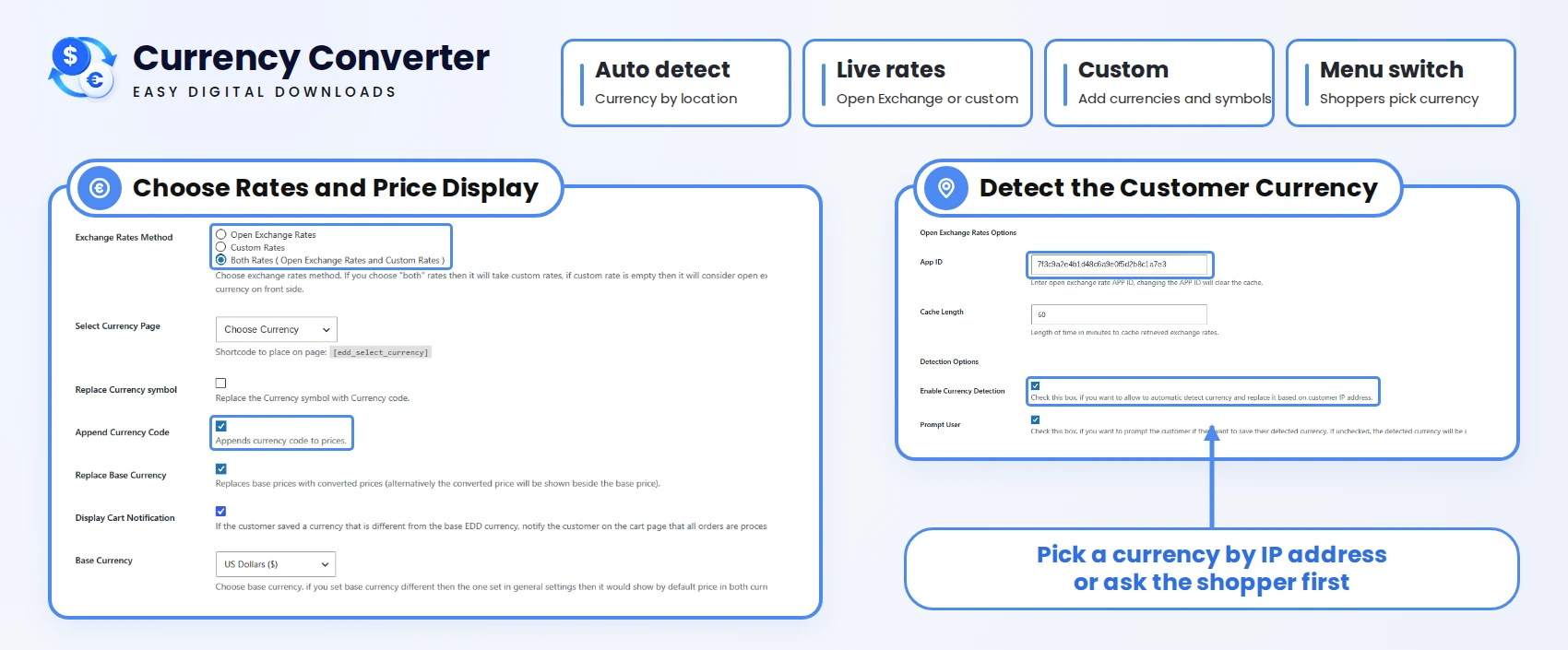


Key Features

Detect Currency From the Customer’s Location
Make international shopping more convenient with automatic currency detection using the EDD currency converter extension. The plugin identifies a customer’s location and displays product prices in the corresponding currency, helping visitors understand your pricing without manually selecting their preferred currency.

Let Shoppers Choose Their Preferred Currency
Give customers control over how they view product prices using a currency converter extension. Add a currency selection dropdown to your storefront using the [edd_select_currency] shortcode, allowing visitors to switch between available currencies whenever they want.

Show the Selected Currency in Your Menu
Make currency preferences easy to access by displaying the selected currency in your website’s navigation menu. Use the dedicated shortcode to show customers which currency they are currently browsing with, providing a more convenient shopping experience.

Choose Automatic or Manual Exchange Rates
Manage currency conversion to match your store’s needs. Integrate Open Exchange Rates to retrieve exchange rates automatically or enter rates manually using the EDD currency converter extension. This flexibility helps you control how product prices convert and display across currencies.

Arrange Currencies With Drag and Drop
Keep your currency selection options organized with simple drag-and-drop functionality using the currency converter extension. Arrange available currencies in your preferred order to make the dropdown easier to navigate and help customers quickly find their desired currency.

Add Custom Currencies and Symbols
Expand your currency options by adding custom currencies along with their corresponding symbols using our currency converter extension. Configure the currencies you want to support and provide international shoppers with familiar currency formats when viewing digital product prices.

Choose How Converted Prices Appear
Choose how product prices appear when customers switch currencies using the EDD currency converter plugin. Display only the converted price or show both the original and converted amounts together. This flexibility helps customers understand pricing while maintaining transparency across your store.

Explain the Payment Currency Before Checkout
Keep customers informed about your store’s payment currency before they complete their purchases using our currency converter plugin. Display a notification on the cart page explaining that orders are processed in your store’s base currency, even when prices are displayed in another currency.

Add Currency Codes to Product Prices
Make product pricing clearer by displaying currency codes alongside converted amounts using our EDD currency converter extension. Enable currency codes such as USD, EUR, and GBP to help customers distinguish between currencies that may share similar symbols and avoid pricing confusion.
Let shoppers compare the products without calculating exchange rates manually

Choose Your EDD Currency Converter Plan
Select a licence for your store or the websites you manage.
1 Website
Includes all plugin features, updates, and support throughout your subscription.
3 Website
Includes all plugin features, updates, and support throughout your subscription.
Unlimited Websites
Includes all plugin features, updates, and support throughout your subscription.
Currency Converter Features Included in Every Plan
Choose how customers view prices and how your store manages currency conversion.
- Location-Based Currency Detection
- Open Exchange Rates Integration
- Drag-and-Drop Currency Ordering
- Converted-Only or Dual Price Display
- Currency Selection Dropdown
- Saved Currency Menu Label
- Manual Exchange Rates
- Custom Currencies and Symbols
- Base-Currency Cart Notice
- Currency Codes Beside Prices
- Responsive Currency Selector
- Localisation Support

14-Day Money-Back Guarantee.
Install the Easy Digital Downloads Currency Converter extension. If it doesn’t meet your expectations, contact our support team within 14 days, and we will refund you without asking any further questions.
Discover what our customers have to say about their experience with our plugins. Read genuine reviews and see how our solutions help businesses simplify their workflow. 5.0/5
Are you a customer? Thanks, great plugin. Everything works as it should. Great support. Recommend) excellent serviceAll Ratings & Reviews
Submit your review
Feature Availability
Customer Support
More Screenshots
Technical Info


Frequently Asked Questions
Here are answers to your questions about our Easy Digital Downloads Currency Converter extension.

No. The plugin converts product prices for display purposes only. All orders are processed in your Easy Digital Downloads store’s base currency, regardless of the currency selected by customers.
Yes. You can add a currency selection dropdown to your storefront using the `[edd_select_currency]` shortcode. Customers can choose from the available currencies and view product prices in their preferred currency.
Yes. You can choose to display only the converted price or show both the original and converted prices together. This helps customers compare prices and understand the actual cost of the product.
No. You can retrieve exchange rates automatically through Open Exchange Rates or enter them manually. This gives you more flexibility to manage currency conversion based on your store’s requirements.
Yes. The plugin allows you to add custom currencies directly from your WordPress dashboard. You can also define their currency symbols and organize the available currencies using drag-and-drop functionality.
You can display a notification on the cart page when a customer’s selected currency differs from your store’s base currency. This clearly informs customers that their orders will be processed in your store’s original currency.
Every license includes all plugin features, along with one year of plugin updates and technical support. You can choose a Starter, Business, or Agency license depending on how many websites you want to use the plugin on.