





The White-Label Edition of Social Auto Poster
Mingle SAAS - Social Auto Poster & Scheduler
A SaaS-ready solution with payment gateway support that lets you manage your shoppers and use AI-assisted caption generation to run your own social media scheduling business. Mingle - social media auto poster & scheduler PHP script lets you launch your own subscription-based social media management platform. Allow customers to connect their social accounts, publish and schedule posts across 12 supported networks, and manage everything from a single dashboard.
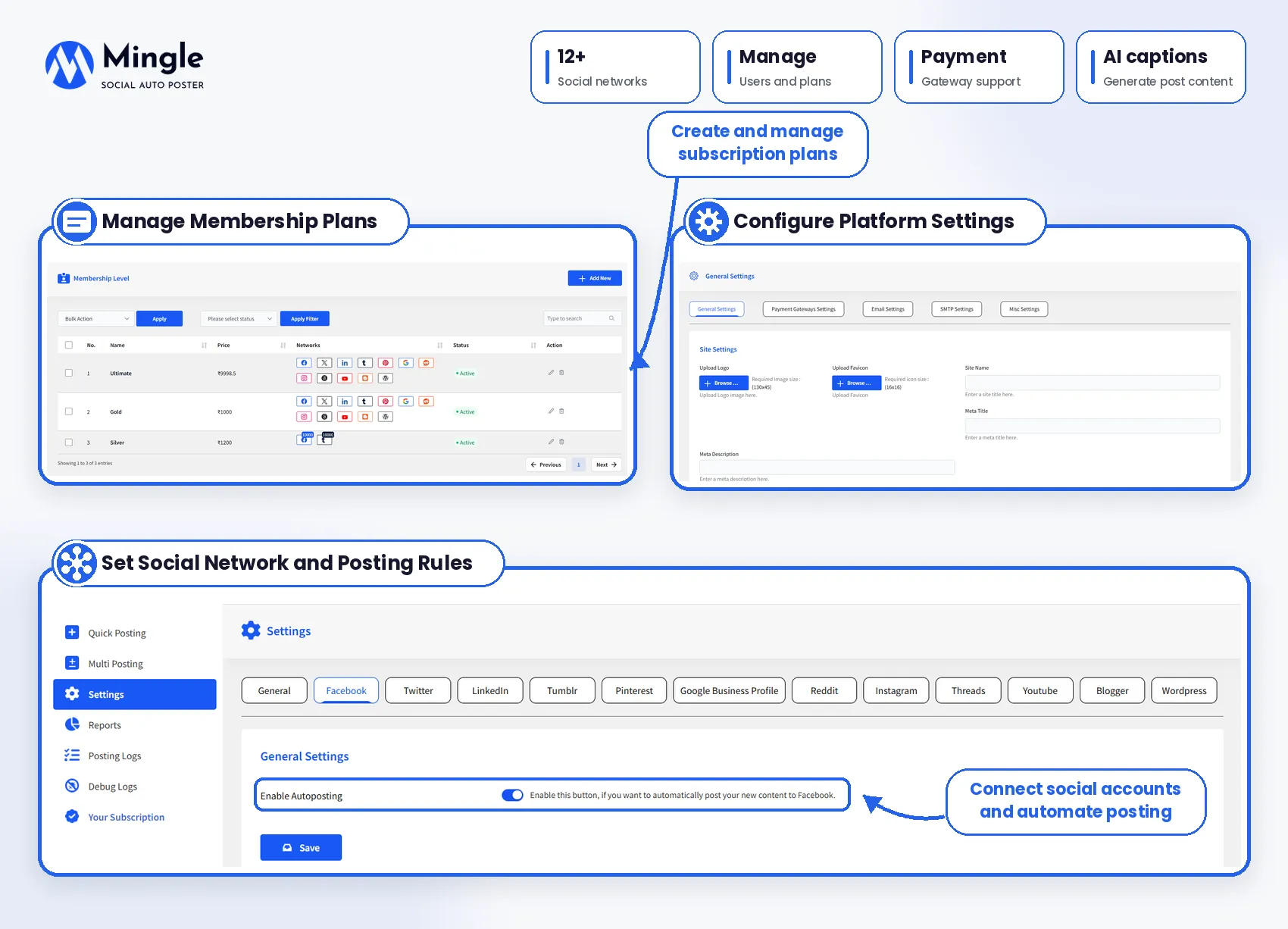


Key Features

Launch Your Own Social Media SaaS
Using the Mingle SaaS plugin, you can start your own social media scheduling business offering a self-hosted PHP script. Run the platform on your own server, customize the branding, and let customers register and manage their social media publishing.

Create & Manage Membership Plans
You can create unlimited membership plans with different prices, durations, social network access, and account limits. Offer plans that suit different customer needs and manage subscriptions directly from the admin dashboard.

Accept Recurring Payments With Stripe
With Mingle Social Auto Poster, you can collect payments through Mingle’s built-in Stripe integration. Customers can subscribe to paid plans, renew memberships, and upgrade subscriptions, while you can track payments and manage memberships from the admin panel.

Auto Post to 12+ Social Networks
You can publish content across Facebook, X (Twitter), LinkedIn, Tumblr, Pinterest, Google Business Profile, Reddit, Instagram, Threads, YouTube, Blogger, and WordPress using the Mingle SaaS plugin. You can connect multiple supported accounts and manage social media posting from one platform.

Schedule Posts for Different Social Networks
You can schedule your content for the time you want to publish it using Mingle’s scheduling options. You can set a common publishing time for multiple networks or schedule posts individually, such as scheduling a post at 5 PM for Facebook and you can schedule the same at 7 PM for LinkedIn.

Generate Social Media Captions with AI
You can use Milgle’s OpenAI integration to generate social media captions from a webpage or WordPress post URL. Enter the link, choose the word limit, and generate a message that you can review before publishing.

Quick Post to Multiple Social Accounts
You can share text, images, links, and supported videos directly from the Quick Post dashboard. Also, you can select the social networks, choose your accounts, and publish immediately or schedule the content for later.

Create & Schedule Multiple Posts
Prepare multiple social media posts using Mingle’s Multi Post feature. Add content, select publishing accounts, customize messages for various networks, and schedule posts without repeating the entire process.

Manage Unlimited Customers
The Mingle SaaS plugin allows customers to register and use your social media scheduling platform. You can add, edit, and manage customer accounts, assign membership plans, and control access to available features from the admin dashboard.

Set Social Account Limits for Each Plan
You can decide how many social media accounts customers can connect under each membership plan. Set individual account limits for supported networks and offer different access levels based on customers’ subscriptions.

Publish Images, Videos, Reels & Stories
You can go beyond text and link posting using the Mingle Social Auto Poster plugin. The plugin supports image and video publishing on selected networks, including Instagram Reels and Stories, Facebook Reels, Threads videos, and YouTube uploads.

Customize Social Media Post Messages
Create different messages for different social networks instead of publishing the same text everywhere using the Mingle plugin. You can add custom titles, links, images, and descriptions wherever supported to match each platform’s posting format.

Track Social Posting Logs & Reports
You can keep track of your social media publishing activity with posting logs and graphical reports using the Mingle plugin. Review post statuses, check activity across networks, and use debug logs to investigate posting failures.

Manage Subscriptions, Renewals & Payments
You can handle customer memberships from one place using the Mingle SaaS platform. You can view payment histories, manage active subscriptions, track renewals, and let customers upgrade their membership plans as their social media requirements grow.

Customize Branding, Languages & Currency
Make Mingle fit your business with customized logos, favicons, website details, and CSS. The script also supports multilingual configuration and multiple currencies for businesses serving customers in different markets.

Advanced Social Network Posting Options
You can access network-specific publishing settings, including Reddit flair mapping, Google Business Profile action buttons, LinkedIn company page posting, and publishing content to connected WordPress and Blogger websites using the Mingle plugin.
Run Your Own Social Media Scheduler & Grow Your Business

Flexible Pricing Plan
Choose the plan that best suits your business needs, and social media auto-posts flawlessly.
1 Website
Use on 1 website
1 year of plugin updates
1 year of premium support
5 Websites
Use on up to 5 websites
1 year of plugin updates
1 year of premium support
Unlimited Websites
Use on unlimited websites
1 year of plugin updates
1 year of premium support
All Plans Include the Following Features
- Complete Social Media SaaS Platform
- Recurring Membership Subscriptions
- Multiple Membership Levels
- Payment Gateway Integration
- Payment Tracking & Management
- Membership Upgrades & Renewals
- Prorated Membership Upgrades
- Automated Social Media Posting
- Scheduled Post Publishing
- Unlimited Social Media Accounts
- Multi-Network Post Scheduling
- Quick Post Publishing
- Post Preview Before Publishing
- Custom Social Media Messages
- Share Content Multiple Times
- URL Shortener Integration
- Google Analytics Campaign Tracking
- Social Posting Logs & Reports
- Social Media Statistics
- Customer & Membership Management
- Subscription-Based Network Access
- Automated Subscription Expiry Handling
- Flexible Membership Pricing & Duration
- Customizable Email Templates
- Multi-Currency Support
- Manual Payment Support
- Admin & Customer Dashboards
- Enable or Disable Networks per Account

14-Day Money-Back Guarantee.
Install Mingle SaaS - Social Media Auto Poster & Scheduler PHP Script, and if it doesn’t meet your expectations, you can contact our support team within 14 days, and we will refund you without asking any further questions.
Discover what our customers have to say about their experience with our plugins. Read genuine reviews and see how our solutions help businesses simplify their workflow. 5.0/5 10 Ratings
Are you a customer? Liza-Express This is a fantastic tool for a Startup SaaS business as you already have some of the apps created and you can easily sign into some major ones. The dashboards are very straight forward and not packed with two million items you have to figure out. I also love how some page types work best with quick posting and others with the multi-posting feature where you can choose multiple social accounts and post different things to all of them. I look forward to Telegram channels and TikTok integrations. Also, the team is always updating the code as soon as a bug is discovered. pankajranaji I am using Mingle-Social Autoposter for my websites, and its features are excellent. Linking social media accounts is a breeze. I had been searching for such a tool for years and finally found a great one. Thank you, WPWeb team! I look forward to your continued support and product updates. Hawk009 I purchased and installed Mingle with complete ease. everything was smooth and easy. I editied t to look the way I wanted and it is now branded to my company. I havent used the script as yet but I have had a good look around and see that it is perfecft for what I need. Thanks for this Awesome script. Cdiehr This script exceeded all my expectations! The service provided was first-class; any questions or issues I had were addressed promptly and professionally. I highly recommend this script to anyone in need of a reliable and effective solution. Outstanding job! Wizwazeer It is evident that a tremendous amount of effort and meticulous attention to detail has gone into this product. The comprehensive and clear documentation has made my experience with your product remarkably smooth and enjoyable. Your hard work truly shines through every aspect, and I am incredibly impressed with the functionality and ease of use. Thank you for this product. Your work is greatly appreciated. attunist It is an excellent script and a highly recommended one! It is my feeling that it is underestimated because it doesn't have all these unnecessary bells & whistles. On the contrary it goes straight to the point and delivers what it promises: very easy and centralised social management. I would love to see WPWeb adding IG and TikTok autoposting features (in that order). ndmacambodia I’ve been using Mingle SAAS for just one day, and I haven’t encountered a single problem. It has already transformed how I manage social media content for my business and my clients. The platform is intuitive, fast, and packed with powerful features that make scheduling posts across multiple social networks incredibly easy. One of the standout features is its support for various platforms like Facebook, Twitter, Instagram, LinkedIn, and more — all accessible from a single dashboard. The post scheduler is reliable and flexible, with options for advanced timing and recurring posts, which saves a lot of time. The modern user interface is clean and beginner-friendly. Their support team is also quick and helpful, which adds great value. Overall, Mingle SAAS is a powerful and efficient solution for managing and automating social media workflows. Highly recommended for marketers, small businesses, and digital agencies! NacimFraze Hi.. Everything around this amazing product is Good and very nice! Starting from the product itself, The Author, Customer Support..etc All are Great. Also, I would like to thank the Author for sharing his product with us.. So, Many Thanks. icanhelpyourbusiness Great platform and support. Developers listen to feedback and suggestions!All Ratings & Reviews
Submit your review
Design Quality
Feature Availability
Customer Support
Customer Support
Documentation Quality
Code Quality
Design Quality
Other
Other
More Screenshots
Technical Info
Frequently Asked Questions
Here are answers to your questions about our Mingle SaaS, social media auto-poster, and scheduler PHP script.

Mingle is ideal for entrepreneurs, SaaS businesses, digital marketing agencies, and social media management providers. It helps you launch your own branded scheduling platform and generate recurring revenue through membership plans.
Mingle requires PHP 8.1 or greater, cURL, MySQL 5.0 or greater, and the Apache mod_rewrite module for permalinks. Ensure your hosting environment meets these requirements before installation.
Mingle supports 12 networks: Facebook, X (Twitter), LinkedIn, Tumblr, Pinterest, Google Business Profile, Reddit, Instagram, Threads, YouTube, Blogger, and WordPress. Available publishing options vary by platform.
Yes, Mingle lets you launch a branded social media scheduling platform on your own server. You can manage customers, create subscription plans, set account limits, and offer social media publishing services.
Yes, you can create unlimited membership plans with different prices, durations, social network access, and account limits. This flexibility helps you offer subscription options for individuals, businesses, and agencies.
Yes, Mingle includes Stripe integration to help you collect subscription payments. You can manage memberships, review payment histories, and handle subscription-related activities through the admin dashboard.
Yes, Mingle allows you to schedule posts for specific times across different social networks. You can use a common publishing time or set individual schedules for each platform.
Yes, Mingle integrates with OpenAI to generate social media captions from webpage URLs or WordPress post URLs. You can specify a word limit and review the generated content before publishing.
Yes, Mingle supports text, links, images, and videos, along with selected formats such as Instagram Reels and Stories, Facebook Reels, Threads videos, and YouTube uploads. Availability depends on each platform’s API and account permissions.
Yes, Mingle lets you create customized messages for different social networks instead of sharing identical content everywhere. You can tailor text, titles, links, images, and descriptions wherever supported.
Yes, Mingle allows you to add, edit, and manage customer accounts from the admin dashboard. You can assign membership plans and control access to features according to each customer’s subscription.
Yes, you can configure social account limits for individual membership plans. This allows you to offer different account capacities and features based on each customer’s subscription level.
Yes, Mingle provides posting logs and graphical reports to help you monitor publishing activity. You can review post statuses and use debug logs to investigate publishing failures.
Yes, Mingle supports customization options for logos, favicons, website details, and CSS. It also offers multilingual configuration and multiple currencies to help you serve customers in different markets.
Mingle offers branding and CSS customization options to help you adapt the platform to your needs. For additional functionality, contact the development team to discuss your requirements and customization possibilities.
Yes, Mingle supports publishing content to connected WordPress websites and Blogger accounts. You can manage supported website publishing alongside your social media scheduling activities.
All listed pricing plans include the plugin’s features, periodic updates, and support for the number of websites covered by your subscription. Choose Starter for one website, Business for three, or Agency for unlimited websites.