



Schedule Emails - Follow My Blog Post add-on
Take control of when subscribers receive updates with the Schedule Email Extension for the Follow My Blog Post Plugin. Using the extension, you can schedule follower emails hourly, daily, twice daily, or weekly, instead of sending individual notifications immediately. You can combine multiple post updates and comment notifications into a single digest email, choose your preferred delivery time, and customize email templates to keep subscribers informed without filling their inboxes with separate notifications.


Key Features

Schedule Email Notifications Instead of Sending Immediately
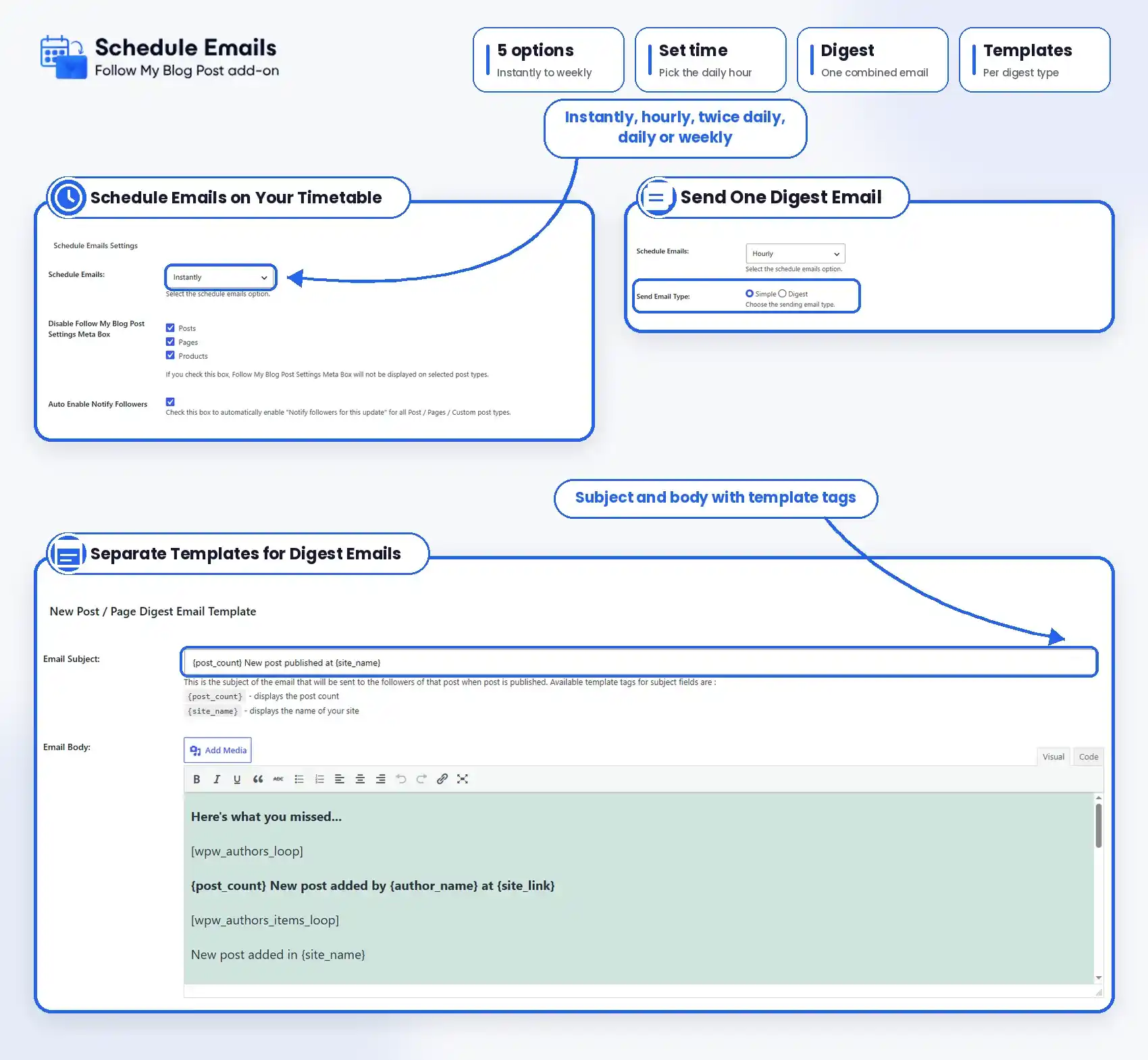
You can control when followers receive notifications from your WordPress website. Rather than sending an email every time a post is published, updated, or commented on, schedule notifications according to your preferred delivery frequency.

Choose Hourly, Daily, Twice-Daily or Weekly Emails
You can select how often your subscribers receive email updates. Schedule notifications hourly, daily, twice daily, or weekly to match your publishing frequency and keep readers informed at regular intervals.

Send Emails at a Specific Time Every Day
You can choose a preferred delivery time when using the daily scheduling option. Set when your follower notifications should be sent instead of relying on immediate emails whenever content changes.

Combine Multiple Notifications Into One Digest Email
Admin can reduce the number of separate emails sent to subscribers by combining notifications into a single digest. Readers can receive multiple content updates together instead of getting an individual message for each notification.

Choose Between Simple Emails & Digest Emails
You can select how you want notifications delivered. You can use simple mode to send individual notifications according to your schedule, or choose Digest mode to combine multiple notifications into one email.
Send Digest Emails for Newly Published Posts
You can keep your followers updated about new content without sending separate messages for every published post. Group new post notifications into a digest email so subscribers can review the latest updates together.
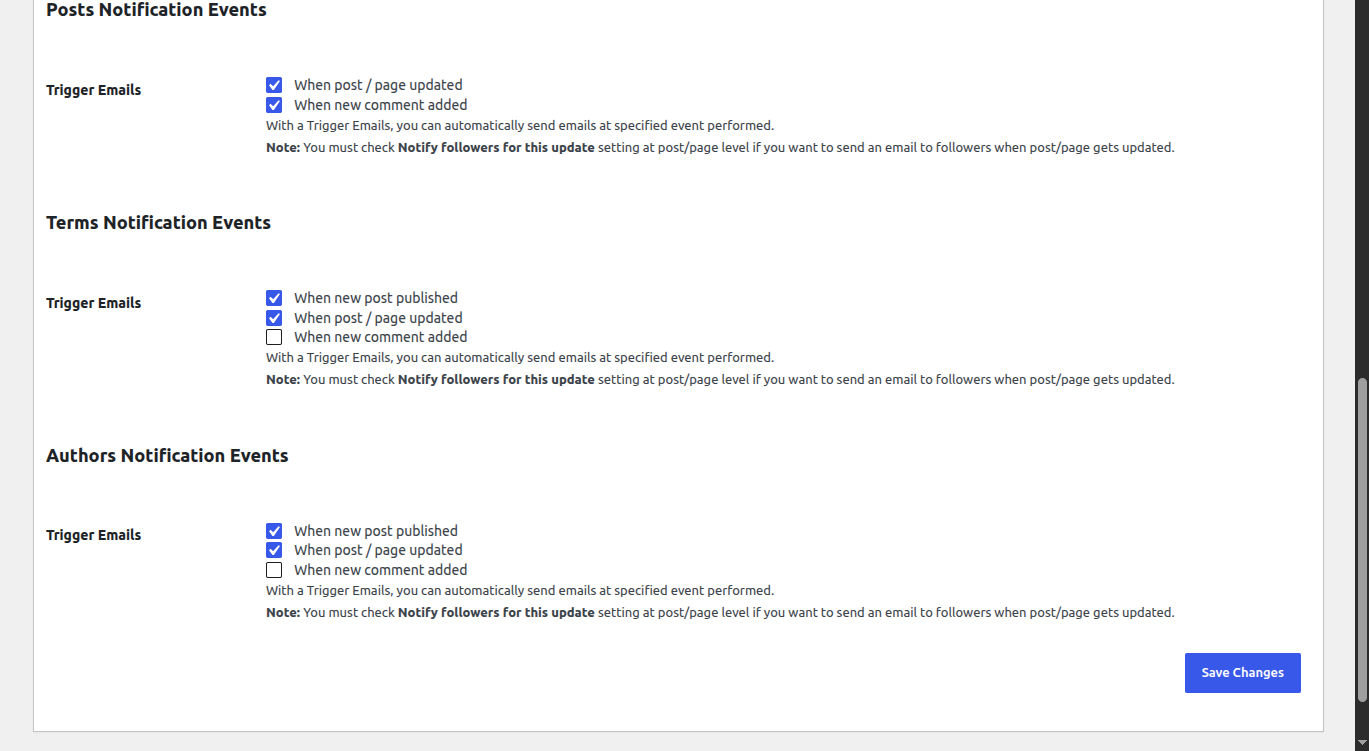
Combine Updated Post Notifications
Your subscribers will get a notification when previously published content is updated. Instead of sending multiple individual emails, use digest notifications to share relevant post updates in a combined message.

Send Digest Notifications for New Comments
You can keep readers informed about new comments on followed content. You can combine comment notifications into scheduled digest emails so subscribers can stay updated on discussions without receiving an email for every comment.
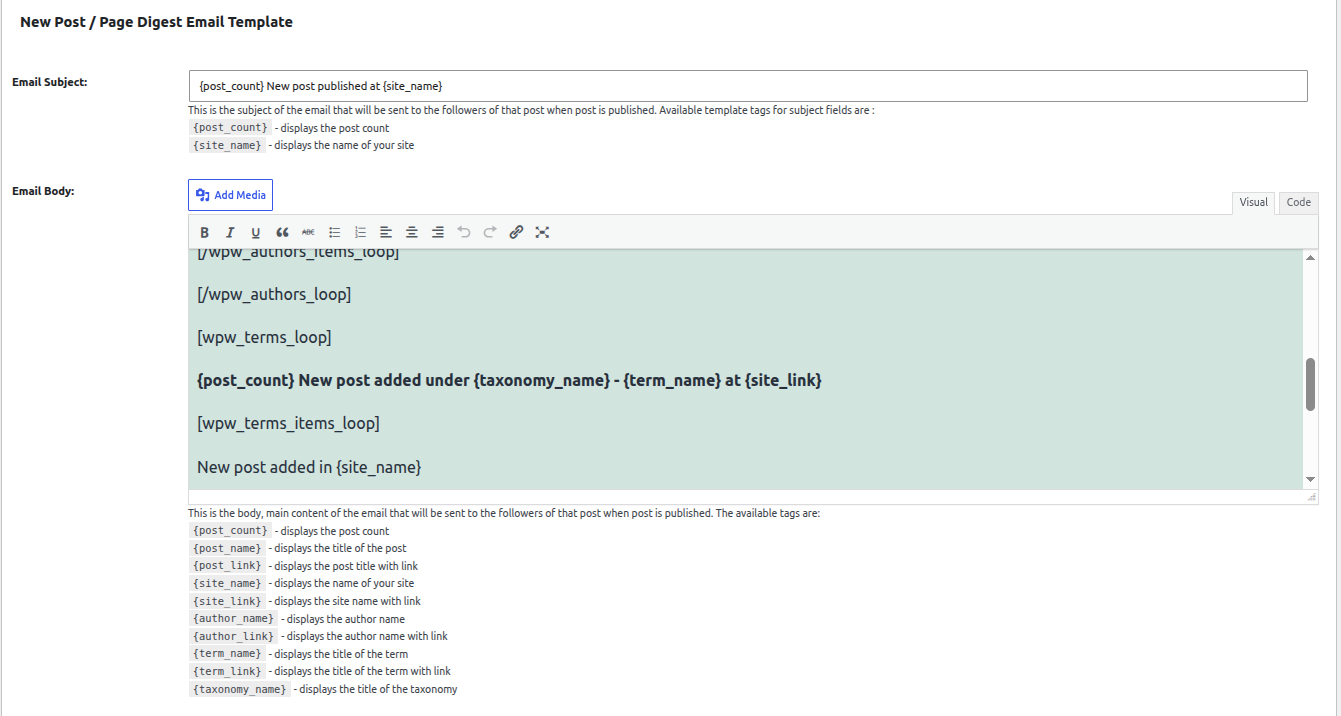
Customize New Post Digest Email Templates
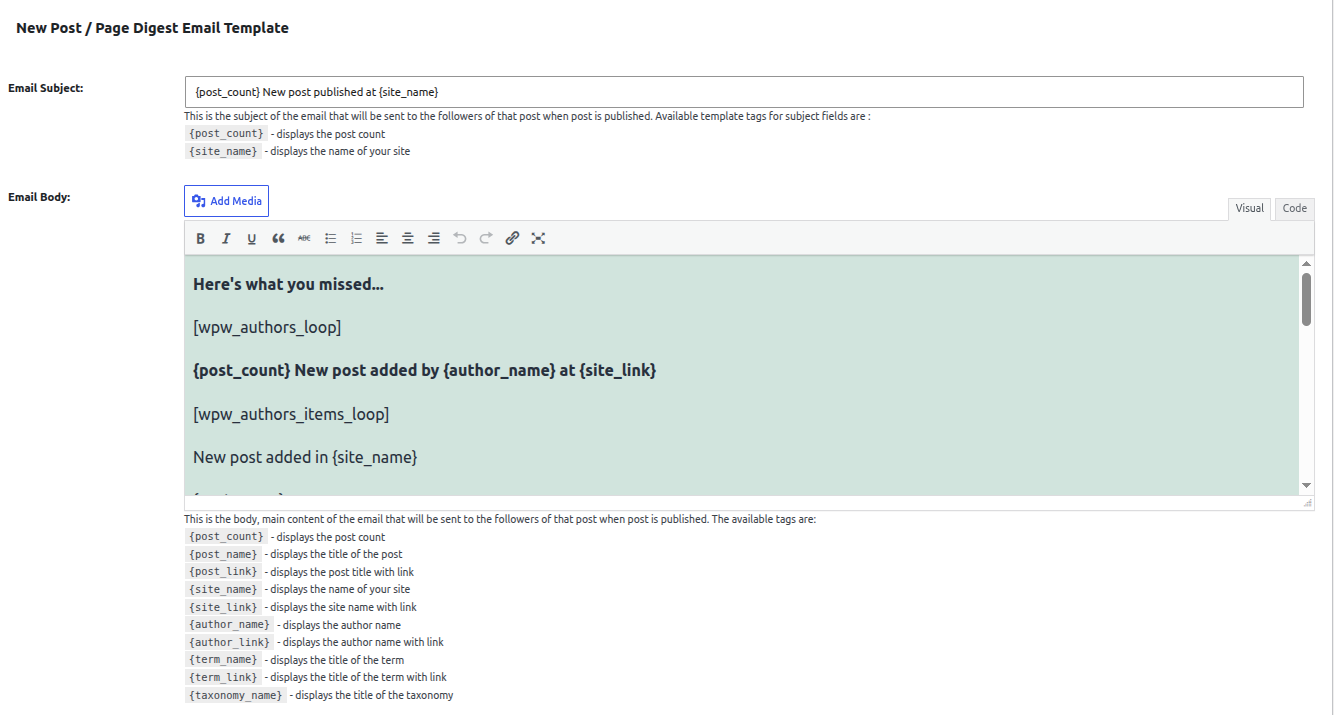
Admin can create a separate email template for newly published content. You can customize the subject line and email body, and include information such as post titles, links, authors, categories, and website details.
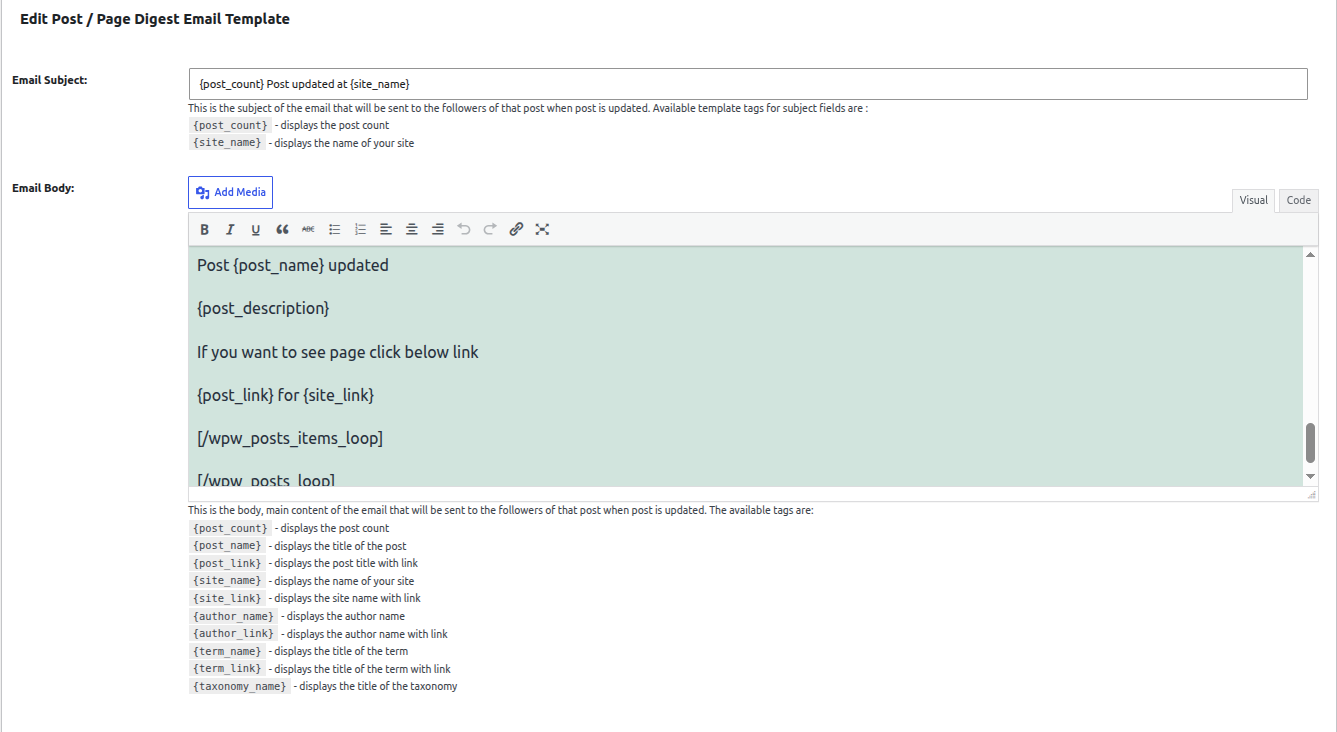
Customize Post Update Digest Templates
Admin can use a dedicated email template for updated posts and pages. Adjust the message, subject line, and content to show subscribers what has changed on the post they follow.
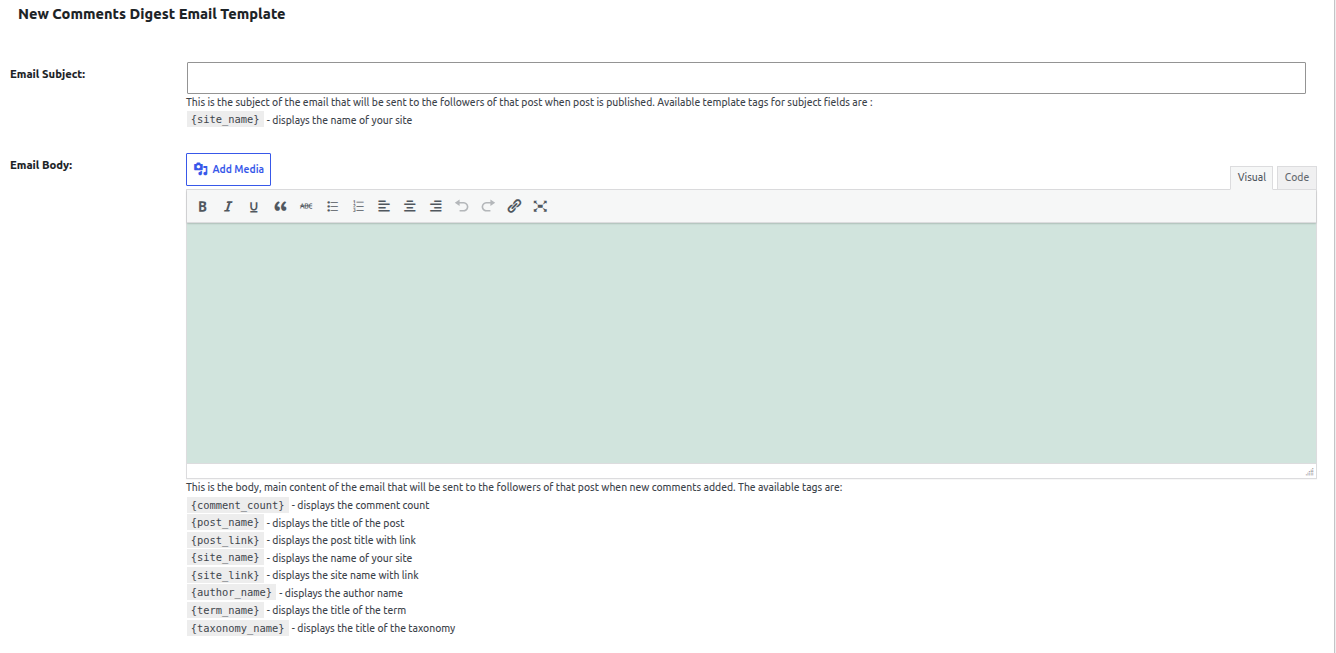
Create Custom Comment Digest Emails
You can customize how comment updates appear in digest notifications. You can include post details, comment counts, author information, and relevant links to help readers return to the discussion.

Personalize Emails With Dynamic Template Tags
Admins can use supported template tags to automatically insert post titles, links, author names, category details, and notification counts into digest emails. Keep messages relevant without manually editing each notification.

Keep Email Digests Organized by Followed Content
Users can choose the available digest templates to present updates related to followed posts, authors, and taxonomy terms. Organize notification content so readers can recognize which posts, categories, or authors have new activity.

Customize Digest Templates Through Your WordPress Theme
Developers can override the extension’s email templates through the active WordPress theme. Adjust the HTML structure and layout without modifying the extension’s core template files.
Keep Your Followers Updated Without Overloading Their Inboxes

Flexible Pricing Plan
Choose the pricing plan that best suits your business needs and schedule follower updates without hassle.
1 Website
Use on 1 website
1 year of plugin updates
1 year of premium support
5 Websites
Use on up to 5 websites
1 year of plugin updates
1 year of premium support
Unlimited Websites
Use on unlimited websites
1 year of plugin updates
1 year of premium support
Extension Features
Get flexible email scheduling, combined digest notifications, and customizable templates to manage how followers receive content updates.
- Scheduled Follower Email Notifications
- Hourly Email Scheduling
- Daily Email Scheduling
- Twice-Daily Email Scheduling
- Weekly Email Scheduling
- Custom Daily Email Delivery Time
- Simple Email Notification Mode
- Combined Email Digest Mode
- Multiple Notifications in One Email
- New Post Digest Notifications
- Updated Post Digest Notifications
- New Comment Digest Notifications
- Custom New Post Digest Templates
- Custom Post Update Digest Templates
- Custom Comment Digest Templates
- Custom Email Subject Lines
- Custom Email Body Content
- Dynamic Post Title & Link Tags
- Dynamic Author Information Tags
- Category & Taxonomy Template Tags
14-Day Money-Back Guarantee.
Install the Follow My Blog Post – Schedule Emails Extension. If it doesn’t meet your expectations, contact our support team within 14 days, and we will refund you without asking any further questions.
Discover what our customers have to say about their experience with our plugins. Read genuine reviews and see how our solutions help businesses simplify their workflow. 5.0/5
Are you a customer? xehch Awesome add-on. We had many many users uploading multiple items. Thanks to this cool feature, we can now reduce the notifications so that it always makes perfect sense for everyone. And customer service has been really, really helpful and reliable. Kubot12 A great idea. Plugin and add-on are still a tiny, tiny fraction of the price you'd pay to do newsletters and the results are much more targeted and engaging. We are extremely happy with the base and this add-on. Maldboy88 Hands down user-friendly & great customer care!All Ratings & Reviews
Submit your review
Feature Availability
Other
Customer Support
More Screenshots
Technical Information


Frequently Asked Questions
Here are answers to your questions about our Follow My Blog Post – Schedule Emails Extension.

Our Schedule Emails add-on allows you to control when email notifications are sent to your followers. Instead of sending notifications immediately, you can schedule them to be delivered hourly, daily, twice daily, or weekly.
Yes. The add-on provides a Digest email option that combines multiple notifications into a single email instead of sending a separate email for each notification. This helps reduce the number of emails your followers receive.
Yes. When using the daily email schedule, you can select a specific Schedule Time at which the notification emails should be sent to your followers. You can choose the schedule that best fits your website’s publishing and notification needs.
Yes. The add-on provides separate templates for New Post Digest, Edit Post Digest, and New Comment Digest emails. You can customize the email subject and body using available template tags such as {post_name}, {post_link}, {post_count}, {site_name}, {author_name}, and {comment_count}.
All license plans for our WordPress Follow My Blog Post – Schedule Emails Extension plugin, including Starter, Business, and Agency, include 1 year of plugin updates and support, ensuring you have access to the latest features, improvements, and assistance when needed.