





WooCommerce PDF Vouchers : Import Voucher Codes add-on
Make voucher migration and management hassle-free using the Import Voucher Codes add-on for WooCommerce PDF Vouchers. Import the existing voucher codes using a CSV file, validate the data before importing, and create orders for your voucher codes without placing them manually one by one.
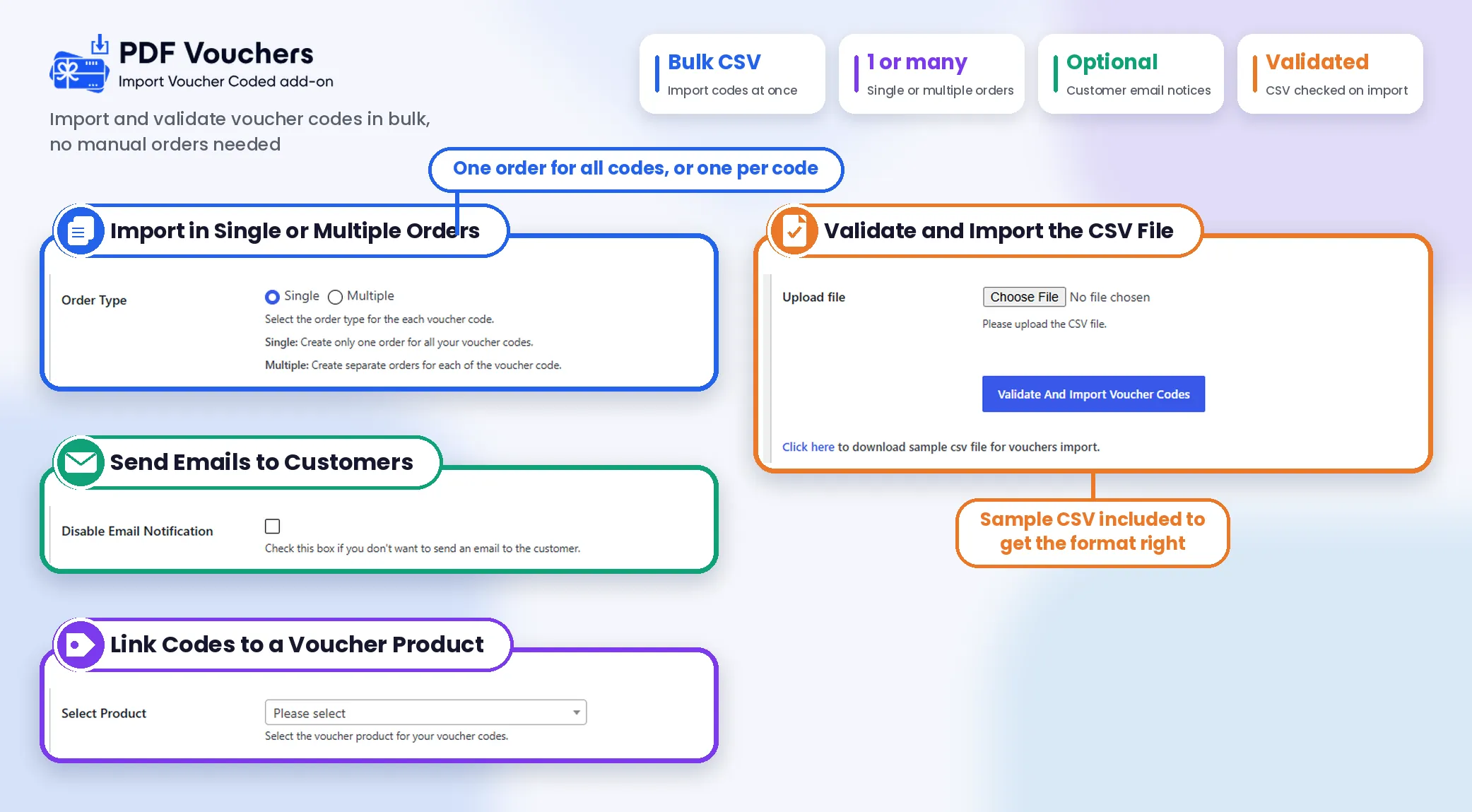


With the Import Voucher Codes Add-on, You Can:

Import Single or Multiple Orders
You can choose how you want to organize imported voucher codes by selecting Single or Multiple order types. You can create one order containing all imported voucher codes or generate separate orders for individual codes, depending on your WooCommerce store’s requirements. This flexibility helps you manage voucher imports more efficiently.

Send Emails to Customers
You can keep shoppers informed by sending email notifications when their voucher codes are imported using the Import Voucher Codes add-on. This helps your shoppers receive their voucher information without requiring you to contact them individually. You can also disable email notifications when importing codes if sending emails is more suitable for your workflow.

Validate CSV File Data
You can check your CSV file before importing voucher codes into your WooCommerce store. The Import Voucher Codes add-on validates the uploaded data and identifies entries that require attention. This helps you detect potential issues early, prepare accurate voucher records, and make the import process more reliable.

Review and Correct Invalid Data
Quickly identify problematic entries when the CSV validation process detects invalid data. Using the Import Voucher Codes add-on highlights the affected information so you can review and correct errors before uploading the file again. This makes it easier to resolve data issues and prepare your voucher codes for a successful import.

Import Valid Voucher Codes
You can import voucher codes that pass the validation process into your WooCommerce store. Our add-on supports the selected order type and skips existing voucher codes to help prevent duplicate entries. This allows you to import eligible codes while avoiding the need to recreate voucher records manually.

Download a Sample CSV File
You can prepare your voucher data more easily with the sample CSV file available in the import settings. Use our add-on as a reference when organizing your voucher information and preparing the file for upload. Following the sample format helps you structure your data before starting the import process.

Simplify Existing Voucher Code Migration
You can move existing voucher codes into your WooCommerce store when migrating from another website or consolidating voucher records. Importing your existing codes through a CSV file can reduce manual data entry and help you bring previously created vouchers into your current store’s workflow.
Import Bulk Voucher Without Hassle

Flexible Pricing
Choose the pricing plan that best suits your business requirements and make bulk voucher import simple.
1 Website
Use on 1 website
1 year of plugin updates
1 year of premium support
5 Websites
Use on up to 5 websites
1 year of plugin updates
1 year of premium support
Unlimited Websites
Use on unlimited websites
1 year of plugin updates
1 year of premium support
All Plans Include the Following Features
Import Multiple Voucher Codes Easily with CSV
- Bulk Voucher Code Import
- Import Codes Using CSV Files
- Import Codes for Single Orders
- Create Separate Orders for Each Code
- Automatic Voucher Order Creation
- Automatic Voucher Code Validation
- CSV Data Validation Before Import
- Highlight Invalid CSV Data
- Skip Duplicate Voucher Codes
- Customer Email Notifications For Imported Voucher Codes
- Option to Disable Email Notifications
- Migrate Existing Voucher Codes

14-Day Money-Back Guarantee.
Install the WooCommerce PDF Vouchers: Import Voucher Codes Add-on. If it doesn’t meet your expectations, contact our support team within 14 days, and we will refund you without asking any further questions.
Discover what our customers have to say about their experience with our plugins. Read genuine reviews and see how our solutions help businesses simplify their workflow.
Bought this product? Be the first to review it All Ratings & Reviews
More Screenshots
Technical Info


Frequently Asked Questions
Here are answers to your questions about our WooCommerce PDF Vouchers: Import Voucher Codes add-on.

The Import Voucher Codes add-on lets you import existing voucher codes into your WooCommerce store using CSV files. It simplifies bulk voucher management and helps reduce manual data entry.
Yes! You can import voucher codes into a single order or create multiple orders, depending on your needs. This gives you flexibility when organizing imported voucher records.
Yes, the add-on validates CSV file data before importing voucher codes. It identifies invalid entries so you can review and correct errors before proceeding with the import.
Yes, you can send email notifications to customers after importing their voucher codes. You can also disable email notifications if you prefer to complete the import without sending emails.
All license plans for our WooCommerce PDF Vouchers : Import Voucher Codes plugin, including Starter, Business, and Agency, include 1 year of plugin updates and support, ensuring you have access to the latest features, improvements, and assistance when needed.